Meme-It's 10pm & You Just Remembered You Have Work To Do
Click on image to see full size.


Click on image to see full size.
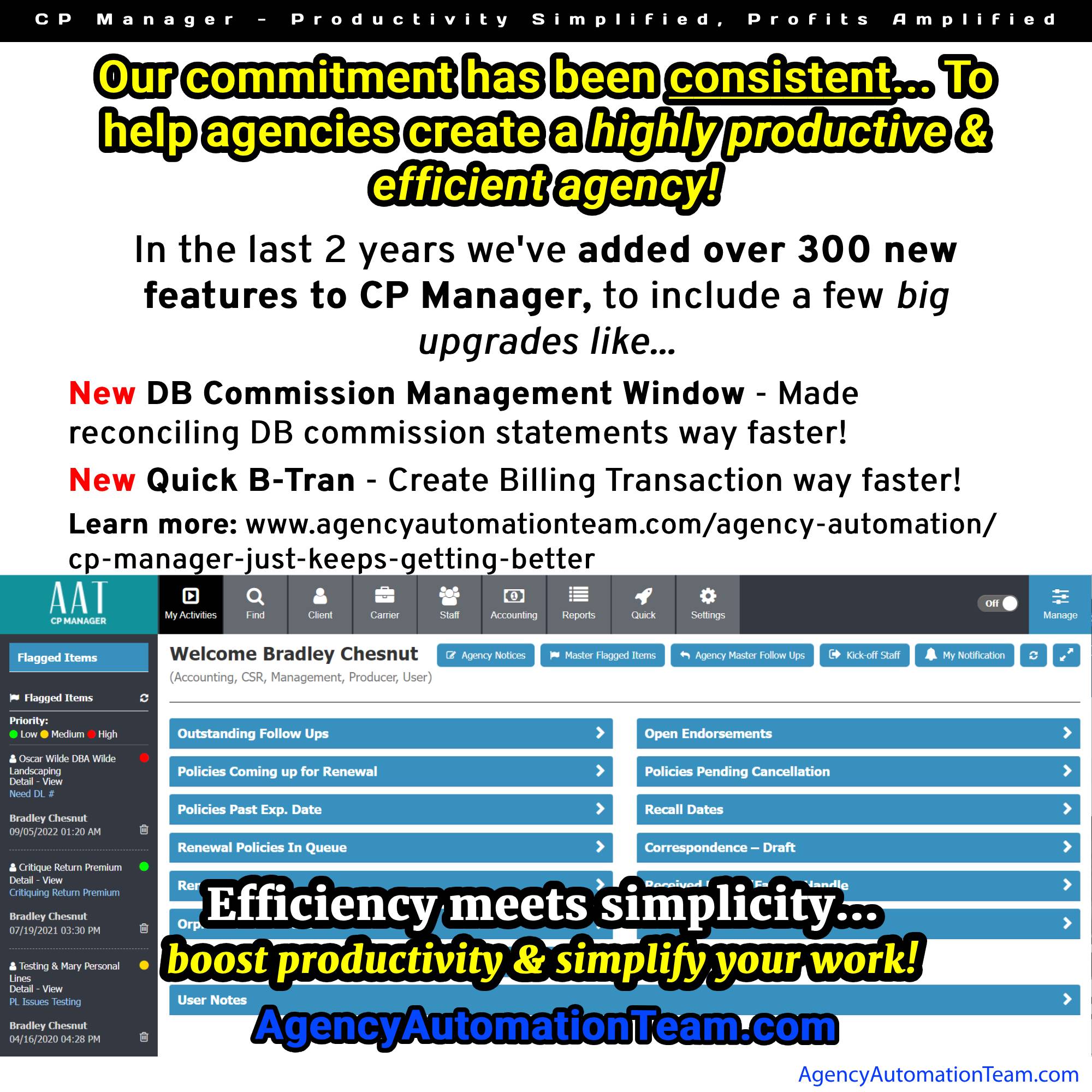
Click on image to see full size.
The foundation to CP Manager's design was based upon workflows and productivity strategies. This is why it took over 10 years to develop instead of the typical 1-1.5 years for feature driven systems.
When faced with an economy like we are today, nothing will do more to help you survive it than increasing the productivity of your staff! This is because...
Increased productivity equals increased profitability."
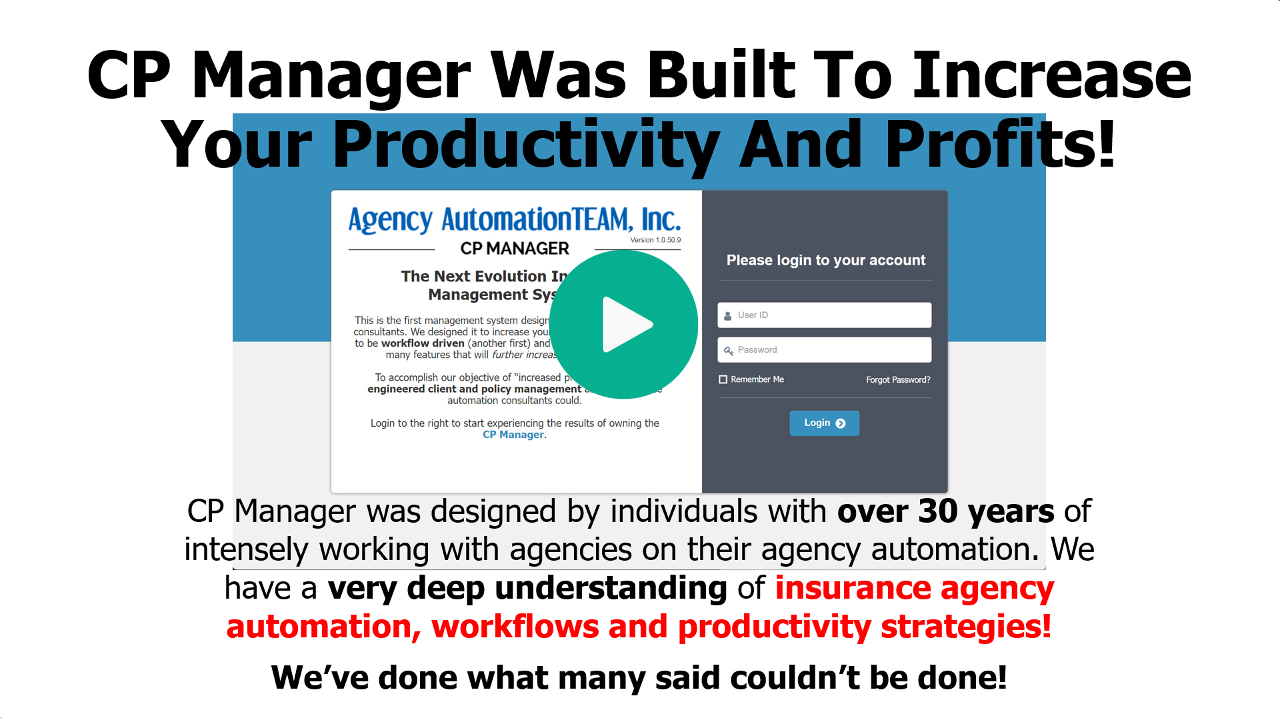
Watch video to learn more...
Click the following video to learn more...
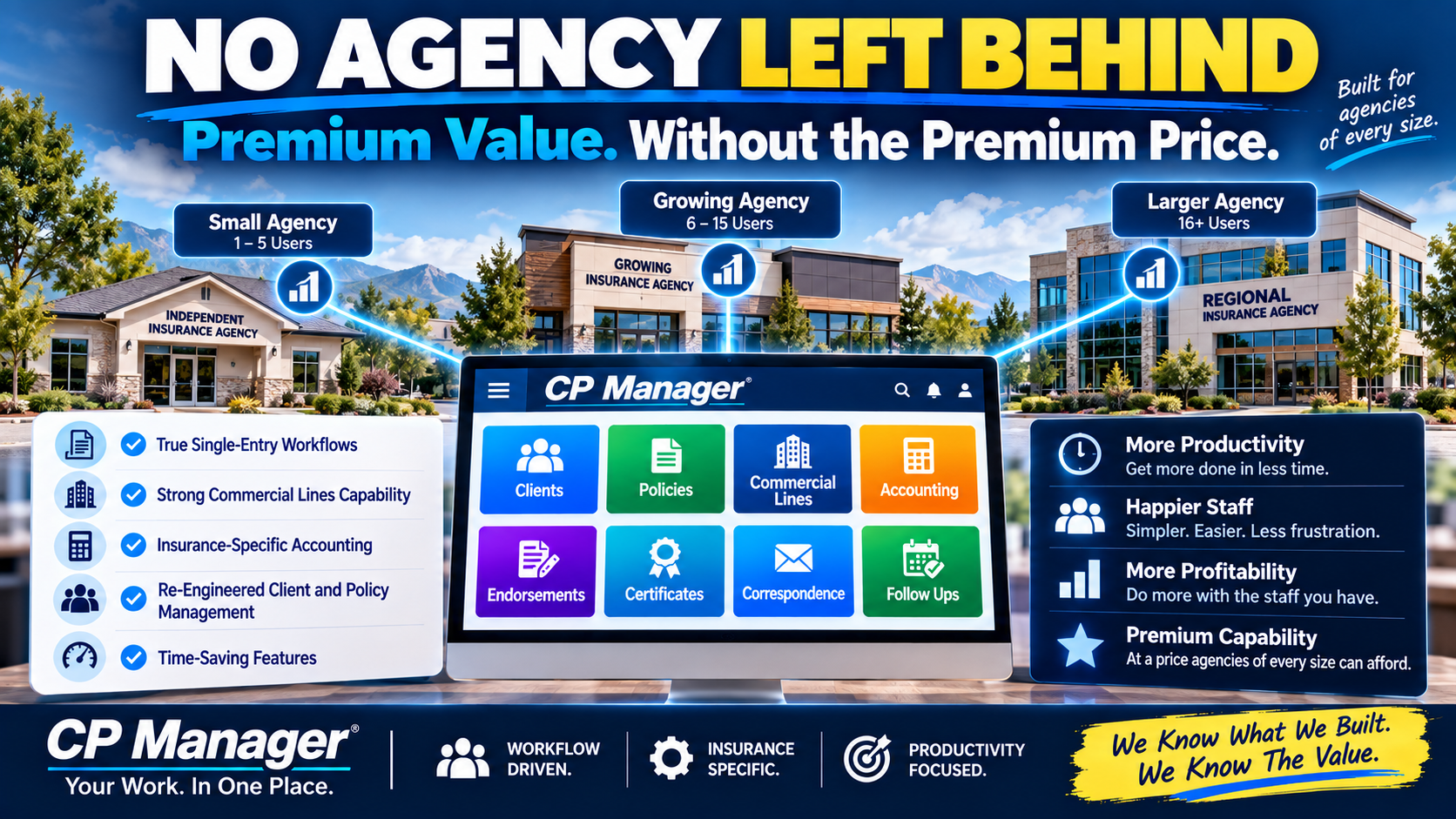
As an insurance automation consultant, I’ve seen it countless times: small agencies on tight budgets need a productive system even more than large agencies do.
But too often, they’ve been forced to settle for a system that fits their budget instead of one that actually fits their needs.
That stops here.
We know exactly what CP Manager is worth. It should be priced alongside the most expensive systems on the market.
But we also know what agencies really need — and we refuse to let price be the barrier. That’s why we’ve adopted a simple philosophy: No Agency Left Behind.
After decades of reviewing systems, I’ve seen the differences that separate low-cost systems from higher-end ones. The biggest areas?
Cheap systems have a lot of double- or triple-entry. Higher-end systems spend more time (and money) mapping fields so data flows everywhere it needs to go.
CP Manager is one of the most single-entry systems ever designed. Enter data once, and it’s instantly available wherever you need it. That’s hours saved every week.
Handling complex commercial policies with multiple sections, drivers, vehicles, and schedules is where most systems simply break down.
When CP Manager was designed we knew the complexity of the Commercial Lines package policy. This is why we started with commercial lines when we wrote the policy side of CP Manager.
Monoline policies is easy. Commercial package policies are a whole other ballgame!
General accounting tools like QuickBooks can’t handle commission reconciliation, trust transactions, return premiums, or carrier sweeps.
CP Manager’s accounting was designed by one of the top insurance accounting experts in the industry. Today, we offer full sub-ledger accounting and will expand to full accounting in our upcoming release. Either way, you get accuracy you can rely on.
The truth is, CP Manager should cost what the “big-name” systems do...
... It’s the first workflow-driven system in this industry.
... It re-engineers client and policy management from the ground up.
... It’s packed with exclusive, time-saving features.
... And it delivers the highest ROI of any system because of how much more productive your staff will be.
By every measure, it’s a premium system.
But here’s the difference:
That’s why CP Manager is priced so that any agency, regardless of size, can afford it.
We know what we built.
We know the value.
And we know the impact it can have on your productivity and profitability.
We also know the industry needs a new standard — where every agency has access to the tools that let them compete and thrive.
That’s why we took the posture of No Agency Left Behind.
And it’s why agencies of every size are saying the same thing: CP Manager is going to revolutionize insurance automation.
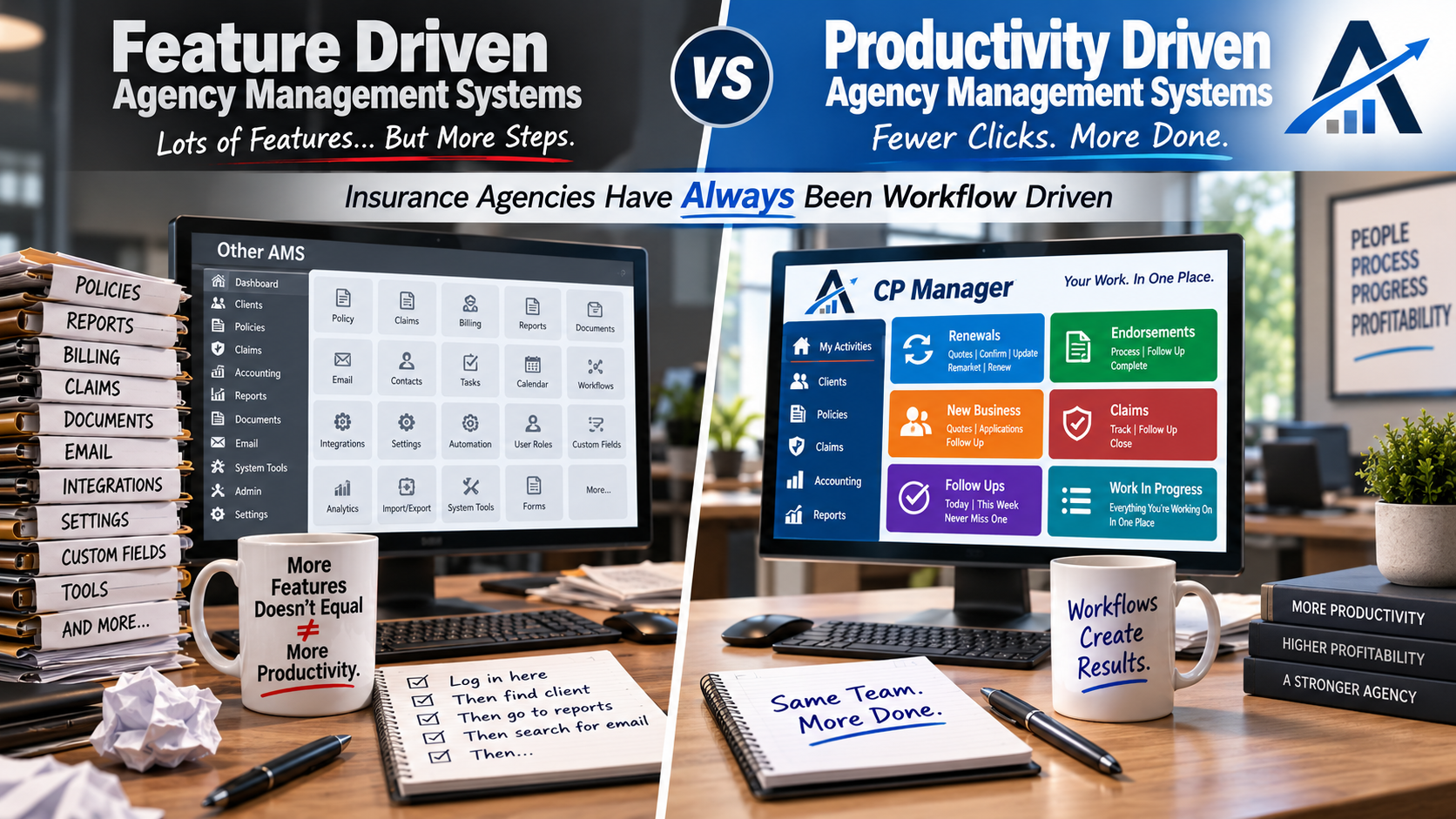
Insurance agencies don’t operate in features. They operate in workflows.
Every day is driven by renewals, endorsements, new business, claims, follow-ups, carrier interactions, and work-in-progress that must move forward without slipping.
For decades, agencies have been forced to adapt those workflows to feature-driven management systems — relying on workarounds, memory, and personal processes just to keep work moving.
That mismatch quietly caps productivity.
CP Manager was designed from the opposite starting point.
After decades of working inside agencies and helping them work around the limitations of traditional systems, CP Manager was built as a workflow-driven management system — designed to align the software to how agency work actually flows.
When the system matches the workflow, productivity stops being forced. It becomes an intregal part of the system.
There are two key reasons why it's taken so long...
First...
Programmers are only trained to design feature-driven systems... There is no blueprint or training on how to build a productivity-focused, workflow-driven system.
Second...
Until now, there hasn't been anyone with the key skill sets needed to design one...
While everyone in the industry knew the insurance industry was workflow driven, knowing how to build a workflow productivity-driven system wasn't something they knew how to do.
Instead, vendors created checklists of what an agency management system “needed”—notes, follow-ups, attachments, accounting, etc.—and then set out to plug those features into a client record. This is how pretty much all database programs are created and why they're called "feature-driven".
It’s a straightforward approach, which is why feature-driven systems can often be built and released in just one to two years. Most start with personal lines, sometimes adding a basic version of commercial lines later.
The result?
A system with lots of features on paper, but in practice…
That’s why, despite having more than 30 agency management system options on the market today, many agencies still feel stuck using systems that don’t meaningfully make daily work faster or easier.
The idea behind a productivity-driven agency management system is fundamentally different. Instead of starting with a list of features, you start with workflows—the actual step-by-step processes agency staff perform every day, such as renewals, endorsements, cancellations, and claims.
When building a productivity driven system the approach is completely different.
Rather than listing all of the features needed you instead map out the workflow steps for handling policy tasks and all of the actions/steps involved in the task.
For example, processing an endorsement is very different depending on:
Each of those differences changes the workflow. And each workflow step defines what features are actually needed—and how they should function to be more productive.
This workflow-first approach ensures that every feature exists for a reason: to make the CSR’s job faster, easier, and more accurate.
As an insurance automation consultant, I’ve seen firsthand how important database table structures are. They determine whether your system can be single-entry, whether workflows can be streamlined, and how data flows between modules.
For years, when I suggested improvements to other vendors, I’d hear:
“Our table structures won’t support that.”
That’s why CP Manager was blueprinted and designed from the ground up—with workflow, single-entry, and productivity baked into its DNA. Before a single line of code was written, I spent 18 months mapping out every workflow, task, and data flow. It was grueling—but necessary to avoid the limitations that have plagued every other agency management system.
Blue-printing a productivity driven system is based upon how an agency would use the system step by step, policy task by policy task (ie, Renewal, Endorsement, Cancellation, Claim, etc.), and what work the agency staff needed to stay on top of so things don't slip through their fingers.
Because CP Manager was designed as a productivity-driven system, nearly every “standard” feature had to be completely re-engineered:
The result?
Not only are agencies calling CP Manager “the most insurance-specific system they’ve ever used,” they're ecstatic with the huge drops in their workload because of the huge increase in their productivity.
The way your management system is designed quietly determines how much work your agency can realistically handle — regardless of how experienced or motivated your staff may be.
When a system is feature-driven, productivity gains depend on people working around the software. Over time, that creates friction: more steps, more windows, more mental tracking, and more reliance on individual memory to keep work moving. As volume increases, those small inefficiencies compound.
That’s when agencies begin to feel stretched even though everyone is working hard.
A workflow-driven system changes that dynamic.
When the system is designed to follow how work actually flows through an agency, productivity is no longer dependent on workarounds or hero effort.
Work-in-progress becomes visible.
Tasks stay connected.
Processes feel more natural instead of forced.
The result isn’t just speed — it’s the amount of work each CSR can handle each day.
Agencies gain the ability to handle more business without automatically adding staff, increasing stress, or losing control over daily operations. Decisions about hiring, growth, and service become intentional instead of reactive.
This distinction matters because productivity ceilings don’t announce themselves.
They show up as pressure, backlog, and the sense that “we’re busy, but not getting ahead.”
Understanding whether your system is helping or quietly limiting your agency is the first step toward changing that.
Over the past 40 years, numerous vendors have said they were the next evolution in agency management systems. What constitutes being a "new evolution"?
Changing the programming environment from DOS to windows? Windows to browser-based?
No, those are just changing the environment they operate under. Their layout, structure and how you do your work stayed the same.
The last time there was a major change, a new evolution in agency management systems was in the 1980's when they went from being accounting based to being client-policy driven.
That is until now with CP Manager going from feature-driven to being workflow-driven.
With CP Manager, agencies are reporting faster processing, far less double entry, and smoother daily operations. The system is still feature-rich to support workflows and increasing your productivity. More importantly, it’s built to make agencies more productive and profitable.
Features are important. But so is how efficiently your staff can actually get the work done using them.
If this article raised some questions you'd like to discuss with us, let's talk.
Don’t settle for another feature-driven agency management system that slows your staff down. Experience the first productivity-driven agency management system and see the difference for yourself.
August 31, 2022 - The summer of 2022 has been another busy 3 months for Agency AutomationTEAM. We added 5 important accounting updates this summer.
Here I'm just going to provide a very quick overview of each. For a detailed explanation schedule a walk-through with your account manager. If you don't have CP Manager yet fill out the form to the right to start the process of learning about how much time and money CP Manager will save you.
Commission downloading streamlines your DB commission statement management with DB Reconciliation.
But we took it a step further by giving you the option in setup to also create the producer commission when the AL3 Commission file is processed and converted to a Billing Transaction (many systems call this an invoice). It will create a producer commission for Producer 1 on the policy and will use the producers commission setup for the producers commission % (what we've done for managing producer commissions is a far more efficient and huge time saver).
Along with Commission Downloading we've added the following 2 additional features...
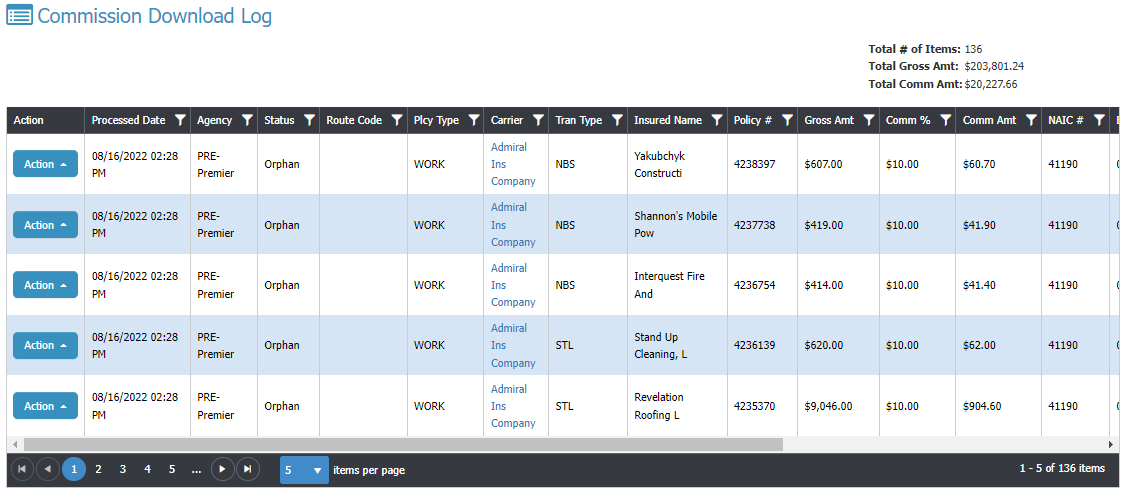
Here you're only seeing some of the fields available. Scroll right for the rest.
This shows you the status of the Commission AL3 downloads... Processed, Orphan, Error. You'll see all of the files in the image ended up in Orphans, meaning, it couldn't find the policy to link to.
Once you process it from the Orphan window it will update the status to Processed.
You can also create a filter so you can see just the downloaded files associated to a specific date to make sure they equal what you were sent (compare to online/paper statement).
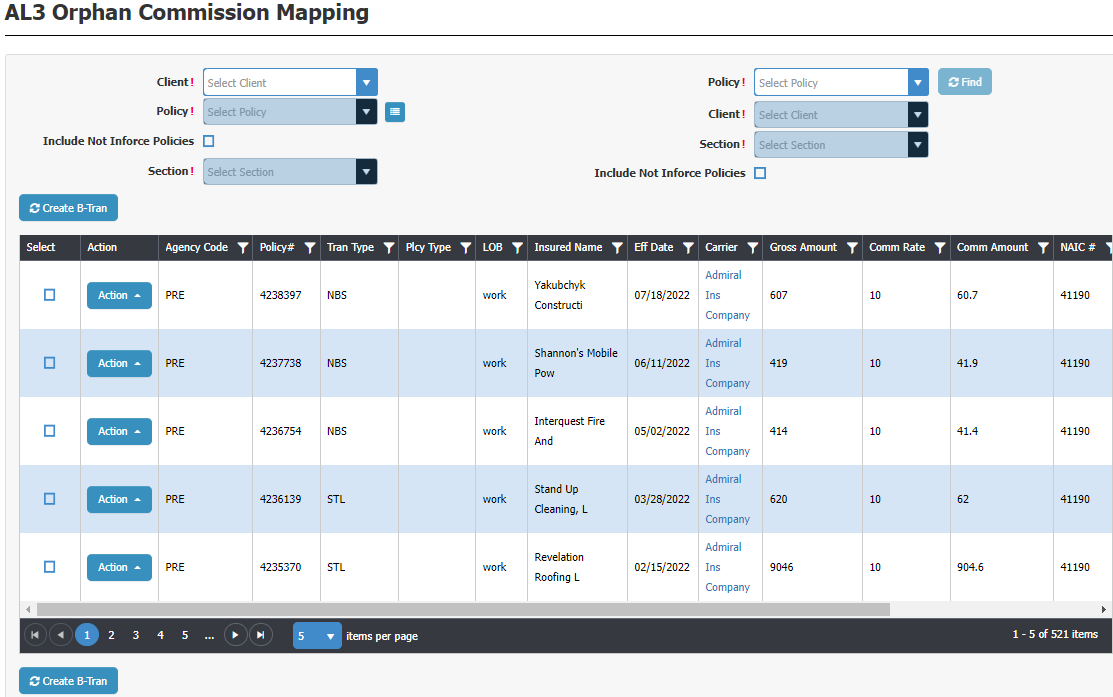
Here you are processing your Commission downloads which orphaned out. You need to first find the policy associated to this commission download. You can select by Client first, then choose a policy for the selected client; or you can enter the policy # which auto-populates the client. You also need to select the Section for the policy because each download is policy section specific.
The process is very easy and very fast.
When processing a Commission download line-item it creates a B-Tran. You can also have it create the producer commissions by turning this option on at Download Setup.
We have a client with 60 users who have huge commission statements. Processing their commission statement was a longer process than they wanted it to be. It's not that our DB Reconciliation wasn't very powerful and efficient, it's that there were a lot of different steps which after a conversation with them Mr. Chesnut blueprinted another window to streamline the Commission Statement management.
The agency and Mr. Chesnut had numerous conversations so Mr. Chesnut was very clear on their steps to pinpoint areas where the process could be greatly improved. The end conclusion is the DB Commission Management Window. The agency says this cut their time by a good 50% if not more. This window has proven to be a huge time saver!
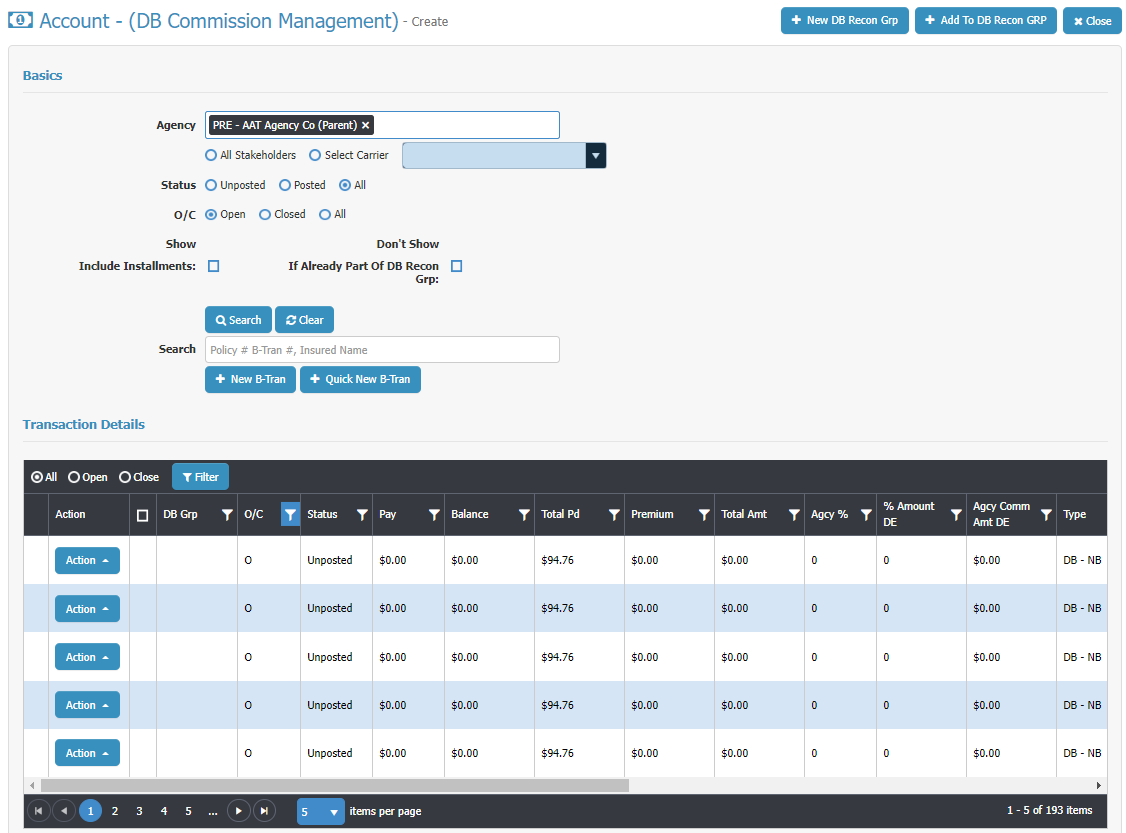
There's a lot of very powerful functionality here! Ask to see this in a Walk-Through. It will cut the time you spend processing your DB Commission Statements way down!
The grid in the image is only showing half of the fields on the grid. You'll see you can scroll to the right to see the other half.
To support a much faster way of processing a DB commission statement Mr. Chesnut also blueprinted a quick B-Tran window to create a much faster way of adding a B-Tran which hasn't been added to the system yet (wasn't downloaded or added by user). It's just one window with everything available by scrolling up and down the page.
It starts by either starting by choosing the Client and then policy, or by entering the policy number which auto-populates the client...
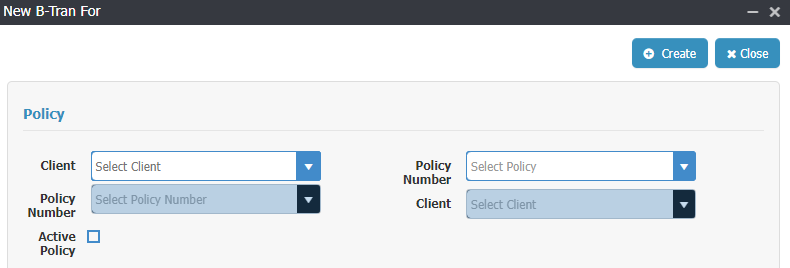
A B-Tran is linked to a policy and pulls information from the policy into the B-Tran. Once you've made your selection from above window the one page B-Tran opens up...
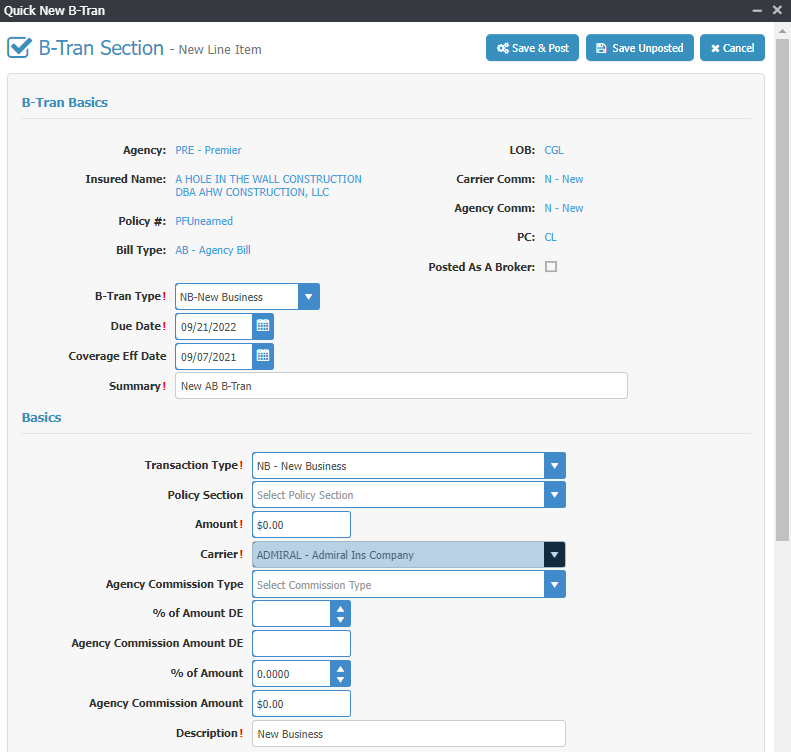
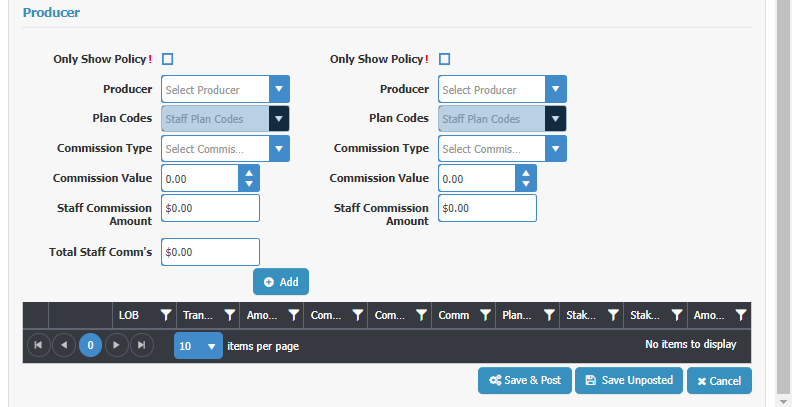
The group "B-Tran Basics" pulls from the policy.
The "Basics" group you finish filling out just like a regular B-Tran.
The "Producer" group you finish filling out like a regular B-Tran. You can add commissions to 2 producers/staff for this line item from here. When done, click "Add" and it adds the information to the Grid below the Add button..
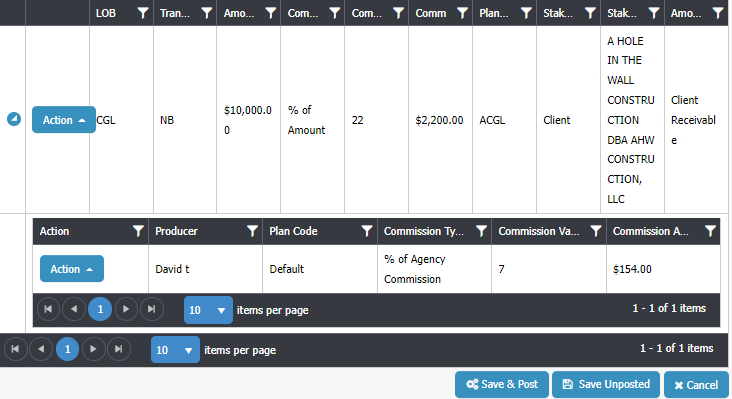
The grid shows you the core information for the line item. If there's a producer commission for the line item there will be an arrow to the left of the Action button you click to open up the producer commissions to see who's being paid what. You can also add another producer commissions here if needed.
Now you scroll back up to "Basic" group and add another line item if needed, like a tax or a fee. Or if this is a package policy with more than one section you can add the line item for the next section of the policy.
All on one page. Very fast, very easy.
By the way, we added the ability to use the Quick B-Tran window from additional places in CP Manager... the Policy, the B-Tran window and from Global B-Trans. Our users are loving us!
We continue to make improvements, tweak and add new features to CP Manager. Next to be released is our Workflow Task Manager in the next couple of months. This is a feature which will blow you away!
August 31, 2022 - By popular demand, we've added Commission AL3 Downloading! Making sure you get paid and producers are paid just got a whole lot easier, and much faster. It's another task which is automated saving you from needing to do it.
Here I'm just going to provide a very quick overview of each. For a detailed explanation schedule a walk-through with your account manager. If you don't have CP Manager yet fill out the form to the right to start the process of learning about how much time and money CP Manager will save you.
Commission downloading streamlines your DB commission statement management with DB Reconciliation.
But we took it a step further by giving you the option in setup to also create the producer commission when the AL3 Commission file is processed and converted to a Billing Transaction (many systems call this an invoice). It will create a producer commission for Producer 1 on the policy and will use the producers commission setup for the producers commission % (what we've done for managing producer commissions is a far more efficient and huge time saver).
Along with Commission Downloading we've added the following 2 additional features...
Here you're only seeing some of the fields available. Scroll right for the rest.
This shows you the status of the Commission AL3 downloads... Processed, Orphan, Error. You'll see all of the files in the image ended up in Orphans, meaning, it couldn't find the policy to link to.
Once you process it from the Orphan window it will update the status to Processed.
You can also create a filter so you can see just the downloaded files associated to a specific date to make sure they equal what you were sent (compare to online/paper statement).
Here you are processing your Commission downloads which orphaned out. You need to first find the policy associated to this commission download. You can select by Client first, then choose a policy for the selected client; or you can enter the policy # which auto-populates the client. You also need to select the Section for the policy because each download is policy section specific.
The process is very easy and very fast.
When processing a Commission download line-item it creates a B-Tran. You can also have it create the producer commissions by turning this option on at Download Setup.
We continue to make improvements, tweak and add new features to CP Manager. Next to be released is our Workflow Task Manager in the next couple of months. This is a feature which will blow you away!

Bradley Chesnut: Founder, System Designer & President
Bradley Chesnut has spent nearly 30 years working directly with independent agencies — teaching productivity strategies, streamlining workflows, and showing staff how to get the most from their management systems.
Time and again, he found the same problem: the biggest obstacle to productivity wasn’t the staff — it was the system they were forced to use.
Agency workflows are shaped by the design of the agency management system itself. If the system requires unnecessary steps, forces duplicate data entry, or scatters information across multiple screens, staff are stuck following that inefficient process every single day.
And while vendors talk about features, almost none teach productivity strategies or workflow design. If they don’t understand how agencies really work, how can they build systems that support productivity instead of hindering it?
Frustrated with this gap, Bradley set out to do what no vendor had done before: design an agency management system from the ground up around productivity strategies and real insurance workflows.
The result is CP Manager — recognized as one of the easiest, most productive, and most insurance-specific systems ever created. Agencies love the streamlined design, the single-entry workflows, and yes — the pricing too.
“The more time we spend checking out CP Manager and seeing how thoroughly integrated the system is, how single-entry it is, how easy it is to use — the more impressed we get.”
Never before has an agency management system been designed by an insurance automation consultant with deep, hands-on experience in agency operations. That’s what makes CP Manager so different. It isn’t just software — it’s the culmination of decades of real-world consulting, productivity training, and workflow design.
👉 To learn more about why this is so significant, read the article: By Agents, For Agents
We are aggressively building on CP Manager. This is because we have many more features blueprinted to be added to CP Manager. Our approach is:

September 28, 2018 – Post Falls, ID. Agency AutomationTEAM, Inc and CP Manager are now IVAN’s certified for downloading for both Personal Lines and Commercial Lines.
