How To Evaluate A Management System

How To Evaluate A Management System

Choosing an agency management system is one of the most important business decisions you’ll make.

After decades of helping agencies through this process, I can tell you there are smart, effective ways to evaluate a system—and there are poor approaches that almost guarantee a bad decision.

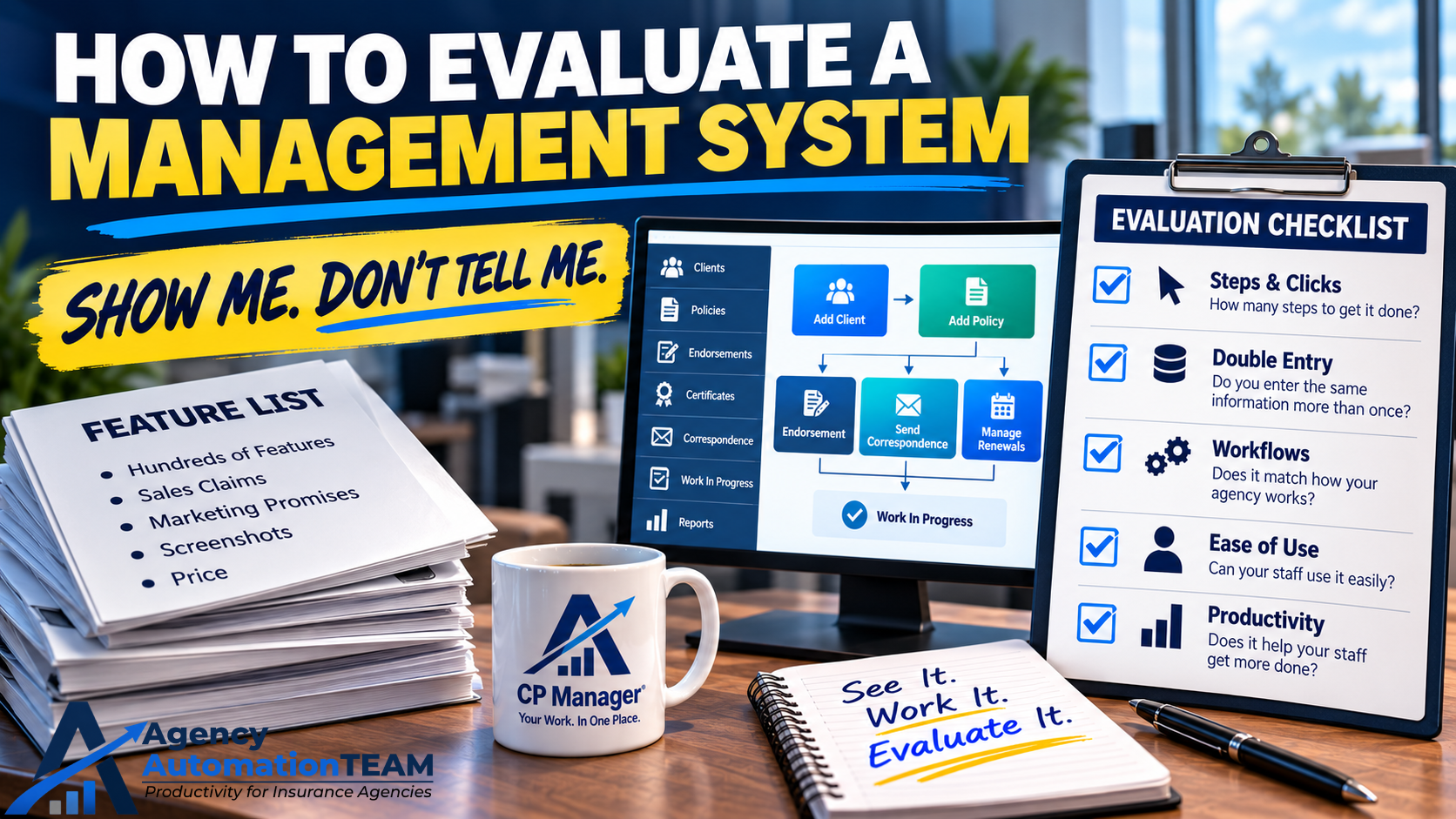
Rule #1: Show Me, Don’t Tell Me

The Importance of a Walk-Through

Let’s be blunt: sales reps often exaggerate what their system can do. Some even stretch the truth.

Example: One vendor advertises “downloading.” But in reality, it only drops a text file into the policy—it doesn’t update the policy. That forces staff to manually update records, which defeats the purpose of downloading altogether.

If you simply ask, “Does your system offer downloading?” the salesperson will say “yes.” Without a walk-through, you won’t realize the feature is nearly useless until it’s too late.

The solution: Insist on seeing the system in action. During a walk-through, have the rep show you exactly how to:

  • Add a client.
  • Add a policy (with full detail).
  • Enter a B-Tran/Invoice.
  • Send an email.
  • Process an endorsement or renewal.
  • See how you stay on top of work in process and open policy tasks.

Pay attention to the steps, clicks, and workflow. How much jumping around does it require? How streamlined is the process?

🔑 Bottom line: A product should sell itself when you see it in action. Without a walk-through, you can’t make a fair determination if CP Manager—or any system—is right for your agency.

Next Step: After a walk-through, if you're still not convinced, the natural next step is a Test Drive. This is where you get either a 7-day or 30-day login to CP Manager where you and your staff can dig in and give CP Manager a real test drive and experience it for yourself.

Once you’ve had a walk-through and you’ve seen how the system works, the smartest next step is to get hands-on. Unfortunately, most vendors don’t allow this — they stop at the demo. That’s why I recommend asking if a system offers a test drive. It’s the only way to know if the workflows truly fit your agency. With CP Manager, we make this possible through both a 7-day and a 30-day Test Drive. Few vendors are willing to do that, but it’s the most reliable way to avoid an expensive mistake.

We’re one of the only vendors that offer this:

  • 7-Day Test Drive ($67): Shared demo agency.
  • 30-Day Test Drive ($197): Full control of your own setup, fee credited if you purchase.

Learn more about our Test Drive program.

Rule #2: It’s Not About Price—It’s About Productivity

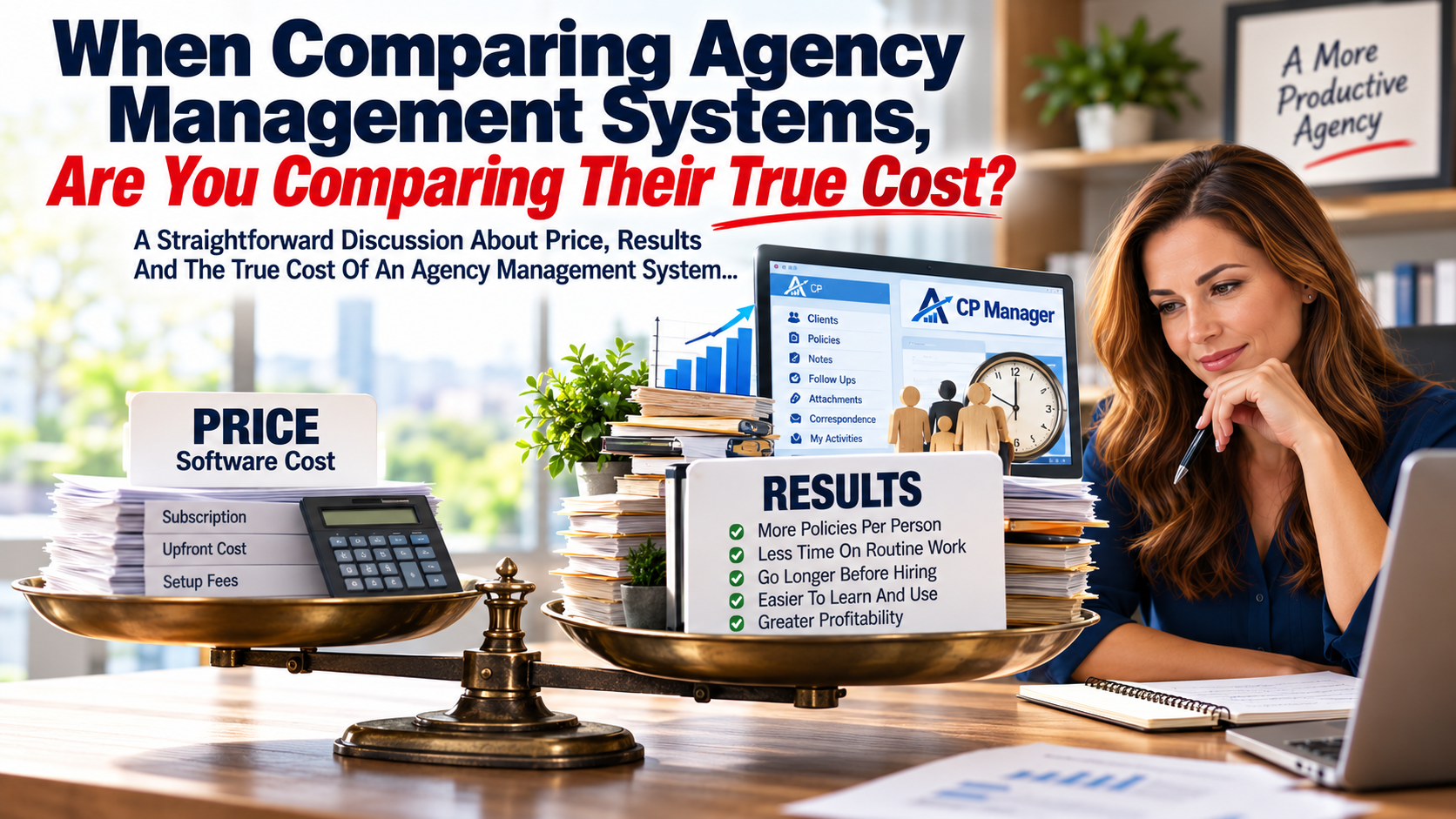
A system’s real cost isn’t the subscription fee—it’s how much time it consumes (or saves) for your staff.

A “cheaper” system that requires 10% more CSR hours will cost your agency far more than you save upfront.

Remember:
Increased Productivity = Increased Profitability.

When evaluating a system, focus on:

  • Double-entry: Does data flow seamlessly, or must staff retype information?
  • Workflows: How many steps does it take to process policy tasks? How does the system help staff stay on top of work?
  • Ease of use: Is the system intuitive, or does it create a steep learning curve and painful transition?

📘 Want to dig deeper? Read: What "Increasing Your Productivity" Really Means to Your Agency and The Big Savings with CP Manager.

Rule #3: It’s Not About Features—It’s Still About Productivity

One of the biggest mistakes agencies make when evaluating a management system is getting distracted by feature lists.

Vendors love to overwhelm prospects with long, impressive catalogs of functions and features. And when they demo the system to agencies, they spend most of the time showing features to "wow" the agency and very little time showing how the system will help them handle their day-to-day work.

But here’s the reality: After talking to many agencies on these bloated systems, most agencies only use 15–20% of those features. Those features they were so impressed with ultimately end up not being used. That's because, when the rubber hits the road, your day-to-day work and increased productivity are what really matter!

This also means they’re paying for a system full of things they don’t use and will likely never need or use.

And worse, all those extra bells and whistles often make the system harder to learn, harder to use, and slower for your staff. Instead of making your team more productive, bloated systems actually create drag.

The real question isn’t “Who has the most features?” The real question is:
👉 “Which system helps my staff get their work done faster and more accurately every single day?”

That’s why the smartest agencies focus on:

  • How the system handles core workflows (adding policies, renewals, endorsements).
  • How much double-entry there is.
  • How easy it is to train new staff.
  • How much time it actually saves per CSR per month.

Features don’t drive profitability. Productivity does.

An agency that saves 35 hours per CSR per month (a 20% productivity boost) will see a far bigger financial return than one that bought the system with the thickest feature catalog but increase the time for every task.

👉 Remember: Increased productivity equals increased profitability. That’s the true measure of a great system.

The CP Manager Review Process

We offer multiple ways to review CP Manager—many without ever speaking to an account manager. Some resources require sharing your information first. Why?

Because CP Manager is unique. It was built from over 30 years of industry experience, combining deep workflow knowledge, programming expertise, and an obsession with productivity. No other vendor has invested the time or money we have to create a true productivity-driven system. Protecting these innovations is essential.

When you do speak with an account manager, you’ll find we’re respectful and not pushy. Our goal is simple:

  • Learn what’s important to you.
  • Recommend the most efficient review path based on your timeline.
  • Help you decide confidently if CP Manager is the right fit.

👉 Let's have a discussion and talk about these 3 points. Let's determine if CP Manager is a good fit or isn't the right fit for your agency upfront to save both of us time.

Reliable Agency Management Software | Why 11 Years to Build

Reliable Agency Management Software

CP Manager Is The Most Reliable Agency Management Software Available Today

Reliability Matters: This is why it took 11 years to build CP Manager... Our commitment was never to rush to market — but to get it right!

Owning a reliable agency management software program should be key in the system you choose. 

But when it comes to agency management software, many systems are rushed to market in 9–18 months. The priority?

Adding just enough “features” to check boxes and sell licenses.

But here’s the hidden cost:

  • Workflows are clunky or non-existent.
  • Staff are forced into double- or triple-entry.
  • Commercial lines get overlooked.
  • Productivity takes a hit — and with it, agency profitability.

Agencies are then left frustrated, fighting their own system instead of serving clients. That’s not reliability. That’s chaos.

This is exactly why CP Manager was built differently.

The Problem With Fast, Feature-Driven Systems

Most vendors focus on getting a system out the door quickly. They start with personal lines only, push commercial lines to “later,” and don't even consider workflows and productivity tools until after launch, months --even years-- down the road.

But here’s the problem: once clients are live on the system, the database structures are locked. Major improvements — like data flowing threw the system to make system more single-entry, workflows, increasing productivity or commercial lines management— become nearly impossible without completely re-doing their table structures which they never do.

The end results is agencies stuck with a system that can never evolve into a highly product and truly reliable agency management software.

The CP Manager Difference: Productivity First, Features Second

When I began this project, I refused to build “just another system.” My 30+ years of insurance automation and consulting made it clear: reliability in agency management software starts with productivity and workflows, not features.

I'm not saying features aren't important. I'm saying workflows and increased productivity must come first and must be foundational to the system. You then re-engineer the features to create the ultimate results you're after... creating a highly productive system.

That’s why we built CP Manager from the ground up with four uncompromising objectives:

  1. Easy to Use – The smoother the system, the faster the transition.
  2. True Single-Entry – Enter data once, see it everywhere.
  3. Commercial Lines First – No more treating commercial as an afterthought.
  4. Productivity-Driven – Every design choice supports agency efficiency.

This approach meant starting with the most complex feature first — commercial lines — and only then adding personal lines. It meant re-engineering how notes, follow-ups, and correspondence should work in the 21st century. And it meant saying “no” to shortcuts that would compromise long-term reliability.

Why It Took 11 Years

Could we have built CP Manager in 18 months?

Absolutely. But then it would’ve been just another clunky, feature-driven system.

Instead, we invested 11 years rethinking every table structure, workflow, and process to ensure reliability. We built, tested, refined, and integrated every piece into a seamless single-entry system before allowing the first agency to go live.

The result?

CP Manager is not only reliable — it’s a commercial lines powerhouse and the most productive system on the market today.

The Pain of NOT Switching to Reliable Software

If you’re still on outdated or clunky software, here’s the cost:

  • Every extra click wastes time and money.
  • Every producer who refuses to enter clients and policies, or do it wrong, dumps more work on the CSRs.
  • Every policy detail that slips through the cracks risks an E&O claim.
  • Every frustrated CSR who quits leaves you with hiring and training headaches.

The truth is simple: the pain of staying with an unreliable system is far greater than the temporary effort of switching to a reliable one.

Ready for a System You Can Count On?

Reliability in agency management software doesn’t come from rushing a product to market. It comes from years of experience, strategic design, and an uncompromising commitment to productivity. That’s why CP Manager exists.

If you’re serious about growing profits, reducing stress, and giving your staff a system they’ll actually love using, it’s time to see CP Manager in action.

Schedule a Walk-Through Today and see why agencies are calling CP Manager the most reliable agency management software they’ve ever used.

For me, this was absolutely no way I would create and release “just another management system.” It was about creating a tool that allows agencies to become the most productive and profitable in the industry.

So the question is:

Are you ready to get your time back, increase profits, and free up more money to reinvest in growing your agency even faster?

Schedule a Walk-Through Today

CP Manager Will Unlock Your CSR’s Full Potential

CP Manager Will Unlock Your CSR's Full Potential

Every agency owner knows the truth: the CSR is the backbone of the agency.

They’re the ones juggling client calls, processing renewals, handling certificates, managing policy changes, and making sure every detail is accurate. When CSRs are efficient, clients are happier, producers are more productive, and the agency flourishes.

But here’s the problem: most management systems make life harder for CSRs. Clunky workflows, endless clicks, and double-entry create unnecessary stress and steal valuable time.

That’s why we built CP Manager. It’s not just another management system — it’s the productivity engine that unleashes your CSR’s full potential.

How CP Manager Transforms Your CSR’s Day

Here’s what your CSRs will gain when using the most productive, workflow-driven system on the market:

  • Built by experts who understand agencies. Designed by insurance automation consultants with 30 years of experience.
  • Productivity that pays. The most efficient system in the industry, giving CSRs time back while boosting output.

  • Streamlined client & policy management. Faster, easier service that strengthens client relationships.

  • Easy to learn, easy to use. A user-friendly design means new hires are productive in days, not months.

  • True single-entry. Eliminate redundant data entry, reduce errors, and get work done faster.

  • Hyperlinked navigation. Instantly jump to clients, policies, carriers, emails, and more with one click.

  • Quick record entry. Create new records with just 5 required fields so CSRs can focus on policy data.

  • Commercial & Personal Lines powerhouse. Commercial Lines was built first, making CP Manager the most efficient system for complex accounts.
  • Multi-entity support. Easily manage multiple agencies, locations, and clusters in one system.

  • Client & prospect management. Stay on top of X-dates and nurture valuable leads without missing a beat.

  • Re-engineered communication tools. Notes, Follow-Ups, Attachments, and Correspondence all streamlined and fully integrated.

  • Certificate management made easy. Send one or thousands — CP Manager makes it simple.

  • Insurance-specific accounting. Simplify financial management with a system built for the way agencies really work.

The Result: CSRs Who Love Their Jobs (and Clients Who Notice)

When your CSRs have a system that works with them instead of against them, something amazing happens:

  • They spend less time fighting the software.
  • They spend more time serving clients.
  • They feel less stress and more confidence in their work.

That leads to happier clients, stronger retention, more cross-selling opportunities, and ultimately — a more profitable agency.

There’s a reason agency staff love using CP Manager.

It makes their work easier, faster, and more rewarding — which makes your agency more successful.

Ready to see how CP Manager can transform your CSRs into productivity powerhouses? Schedule a Walk-Through Today!

By Agents For Agents, Smart Or Not So Smart?

NotSure op

When It Comes to Insurance Agency Software Systems, ‘By Agents For Agents’ Is Just a Cliché That Sounds Good But Doesn’t Guarantee Better Results. Here’s Why…

For over 25 years, I’ve worked closely with agencies to help them automate processes and boost staff productivity. During this time, I’ve seen countless insurance agency management software systems come and go

One of the first questions you should ask when evaluating a management system is, “Who designed it?”

This question is more important than you might think.

Think about it:

  • Would you trust a homeowner or a professional architect to design your house?
  • If a rocket were being built, would you want an astronaut or a rocket engineer to design it?
  • When building a race car engine, would you rather have a race car driver or a specialized mechanic do the job?

In other words, does it make more sense for the expert engineer or the user of the product to design it?

Here’s the problem: users often don’t know everything that’s required to design a truly efficient system. Let me explain what I mean.

The Agency CSR Is the Smartest User — But They Only Know What They Know

Who truly understands an agency’s management system best?

Without a doubt, it’s the CSR — the Customer Service Representative. They use the system every day to process work, service clients, handle policy changes, endorsements, renewals, and track outstanding issues. No one else in the agency uses the system as intensively or consistently.

It’s not the agency owner. Not the producer. Not the bookkeeper.

It’s the CSR.

Most would agree on this point.

But They Only Know What They Know

While CSRs are the most knowledgeable users of an insurance agency software system, their expertise is limited by the training they’ve received—and that training is usually specific to their agency and the particular system they use.

Let me share an example. Back in 2005, I led a Productivity Workshop for clients of one of the more efficient systems on the market at the time. One agency with 15 users sent 5 of their best CSRs, including their lead CSR, to attend. The plan was for these experienced staff members to learn new strategies and then train the rest of the team.

When they arrived, these CSRs confidently told me they had no idea why their owner sent them—after all, they’d been using the system for seven years and considered themselves highly efficient already. They clearly felt the workshop was unnecessary.

I welcomed their skepticism and invited them to listen with an open mind.

The first half of the workshop passed, and as lunch began, these same 5 CSRs gathered around me—this time with smiles. The lead CSR told me they were already convinced the techniques they’d learned would reduce their workload by at least 10%, and another said it might be even more.

By the end of the day, their confidence had grown—they knew for sure their workload would drop by at least 20% thanks to the new strategies they’d discovered. They were amazed by how much they didn’t know, despite their years of experience.

Now, imagine if these 5 committed but initially unaware CSRs were the ones designing your agency management system. Would it really be optimized to maximize productivity?

Or What If the Agency Owner Designed the System Without Deep Workflow Knowledge?

Imagine if the system was designed by an agency owner who wasn’t deeply involved in workflows and processing work. Think of all the critical details they will be missed simply because they didn’t have the in-depth expertise in workflows and productivity strategies that a specialist consultant brings.

As my experience shows, there’s always more to learn—and that’s why I’ve always said:

“Agency staff only know what they know.”

What they don’t realize they don’t know is often what holds them back. Experienced CSRs may be very skilled in what they do, but they rarely recognize the gaps in their knowledge. There is always more to learn to increase productivity and efficiency.

CSRs and vendor trainers typically lack the extensive background in agency automation, workflows, and productivity strategies that insurance automation consultants possess.

Workflow training and productivity strategies are foundational to insurance automation consulting—that’s where our expertise lies.

Where’s The Disconnect?

To understand why there’s room for improvement in CSR efficiency, consider how most CSRs learn their job:

  1. From existing staff who, in turn, only know what they know—since over 90% learn this way; or
  2. From vendor-provided software training.

The problem is, vendor training never includes workflow or productivity strategy training—it only covers basic product knowledge: how to use system features, nothing more.

This means CSRs rarely learn the finer points of creating a highly productive agency and workflows.

In my extensive work with many management systems, I have never seen one that teaches workflows or productivity strategies.

If your agency wants to master advanced workflows and productivity skills, you must turn to an insurance automation consultant—because this is what we specialize in.

I’ve lost count of how many agencies have told me that when they asked their vendor for workflow help, they were told, “Workflows are up to you.” Vendors just don’t teach it.

Just six months ago, an agency using Epic told me the Applied training team refused to help with workflows, only offering product feature training.

Many agencies have shared that when they asked vendor trainers how to handle day-to-day work like endorsements or renewals, the response was that workflow steps were up to the agency—they only teach how to use system features.

Why Aren’t Workflow-Driven Systems More Common?

Because vendors don’t teach workflows or productivity strategies, they cannot build systems designed to support them.

The result? Feature-driven systems that don’t optimize productivity.

This is exactly why CP Manager is the first truly workflow-driven agency management system. It’s been built and refined by insurance automation consultants who specialize in workflows and productivity.

Otherwise, wouldn’t there already be a workflow-driven system on the market?

The truth is, most new systems on the market merely mimic existing feature-driven products—they lack the expertise to design workflow-centered systems.

CP Manager is not “by agents, for agents.” It’s designed by insurance agency software experts who understand agency workflows and productivity inside and out.

CP Manager: Built by Experts Who Truly Understand Workflows and Productivity

CP Manager was created by highly skilled insurance automation consultants—experts in workflows and productivity strategies who train agency producers and CSRs to become more efficient and effective every day.

‘By Agents, For Agents’ Is Often Just More of the Same

Almost every agency management system on the market today is essentially a copy of existing systems with minor tweaks or added features. For example:

  • One newer system tried to stand out by adding a bunch of social media features—but these didn’t actually help agencies increase productivity or improve client service. As a result, that system is struggling to stay afloat.
  • Another system banked on being low-cost, but without strong commercial lines support, no accounting capabilities, and lots of double entry, it’s also having trouble surviving.

If you look closely, most systems share the same core features: ACORD forms, notes, follow-ups, client records, correspondence, and the like. What they consistently miss are workflows, data integration for true single-entry, and a system layout designed to maximize effectiveness by tightly integrating features into a seamless, productive experience.

Systems designed “by agents for agents” tend to focus on cramming in features they think are necessary, without understanding how to build a workflow-driven, highly productive system. That’s because:

No one has built one before—until now.

Introducing CP Manager: The First True Workflow-Driven System

CP Manager breaks the mold. It’s the first workflow-driven system introduced to an industry that has relied on workflows for over 30 years. It’s about time.

CP Manager is not just another “by agents, for agents” system—and that’s a great thing. Who wants more of the same?

See the Difference for Yourself

If servicing your clients faster, helping your CSRs get more done every day, and growing your book of business efficiently matter to you, you’ll love what CP Manager can do for your agency.

Schedule a walk-through of CP Manager today and discover how a system designed to increase your productivity can transform your agency.

CP Manager Just Keeps Getting Better

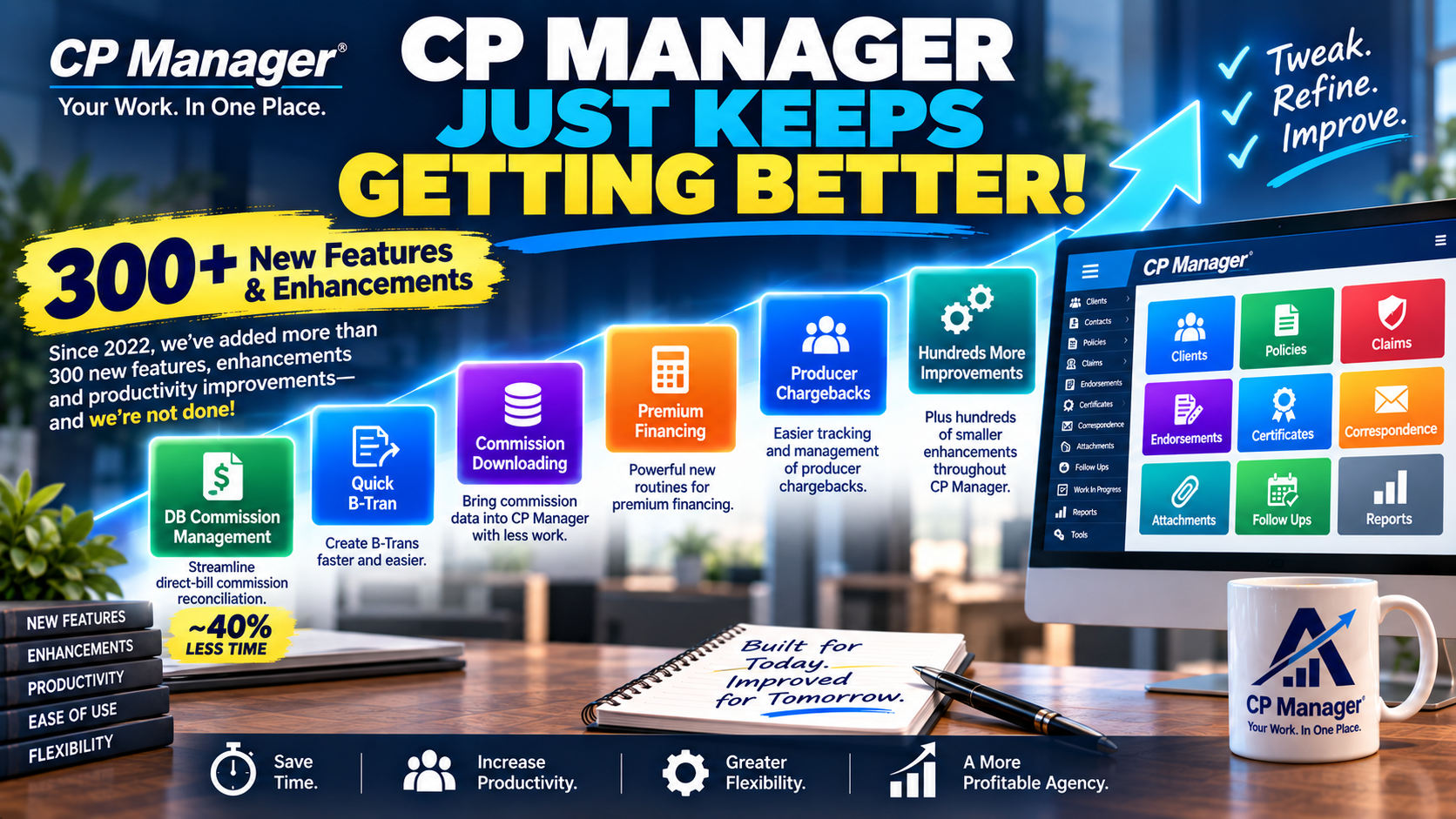
CP Manager Just Keeps Getting Better!

It’s been a while since we’ve shared an update—and for good reason. We’ve been busy building one of the most advanced and productive agency management systems on the market.

Since our last “Upgrades” article in 2022, over 300 new features and enhancements have been added to CP Manager, including some major upgrades that agencies are already calling game-changing.

One of the unique advantages of CP Manager is that it was designed by an insurance automation consultant with over 30 years of experience. That means the system isn’t just built for “features”—it’s built for productivity, ease-of-use, and flexibility. And yes, that also means the system is constantly being tweaked, refined, and improved. Our President, Bradley Chesnut, is relentless about making CP Manager more powerful and more intuitive—and the results speak for themselves.

From the very beginning, our mission has been clear:

  • Massively increase agency productivity so staff can get more done in less time.
  • Keep it intuitive and easy-to-learn, so training time is short and adoption is fast.
  • Support any agency business model—from centralized office teams to fully remote CSRs.
  • Empower producers to work from anywhere, whether they’re in the office, at a client’s business, or meeting prospects in a coffee shop.

CP Manager was also designed to scale. Whether you’re a small agency or a large firm processing thousands of transactions daily, the system includes powerful search and navigation tools that help staff find exactly what they need, instantly—whether that’s a note, attachment, policy, or client record.

And we’ve proven it. One of our largest agencies, with over 80 users across multiple locations, put CP Manager to the test. Their verdict?

  • Client, policy, and task entry: shockingly fast and single-entry simple.
  • Daily workflows: “mind-blowingly easy and efficient.”
  • Multi-agency management: robust enough to handle complex operations.

To support their heavy accounting needs, we took CP Manager’s already strong tools and made them even better. For example, direct bill commission statements that used to run 6, 8—even 10 pages—are now reconciled faster than ever, with fewer clicks and smarter workflows. This is because of the first new major enhancement we'll be telling you about.

Our philosophy has always been the same: every second saved is more time your staff can spend serving clients and growing your agency. That’s why every enhancement we roll out is focused on one thing—making your work faster, easier, and more profitable.

Introducing the DB Commission Management feature...

DB Commission Management Window

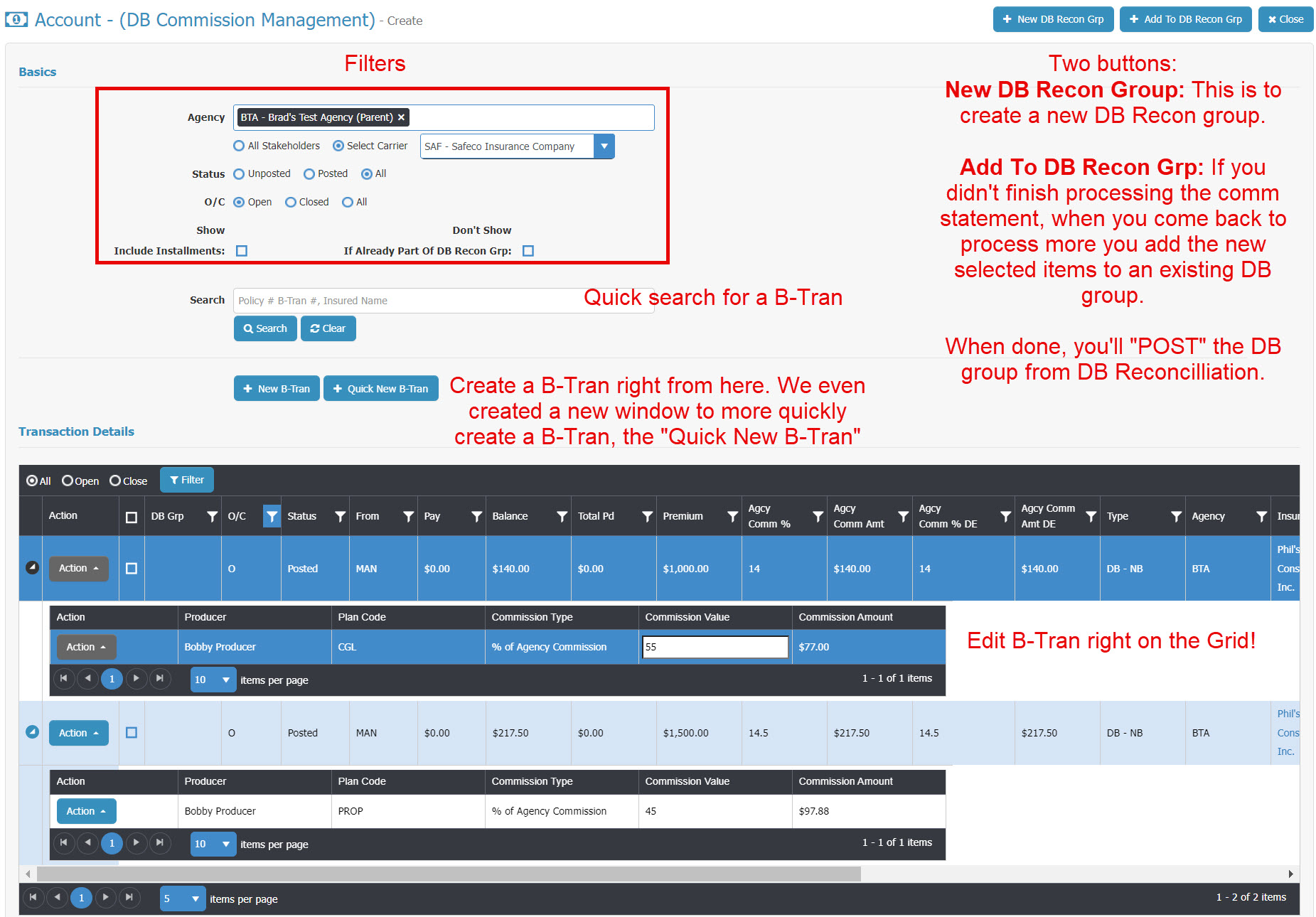
With this new feature we streamlined the DB commission management process dropping the time taking to handle this process by a good 40% with many page commission statements. It's one window where you can do everything needed to reconcile and process your DB commission statements. (Click on images to see it bigger).

This is simply a remarkable new feature. 

To enhance this new feature we created a faster way to create B-Trans on the fly...

Quick B-Tran

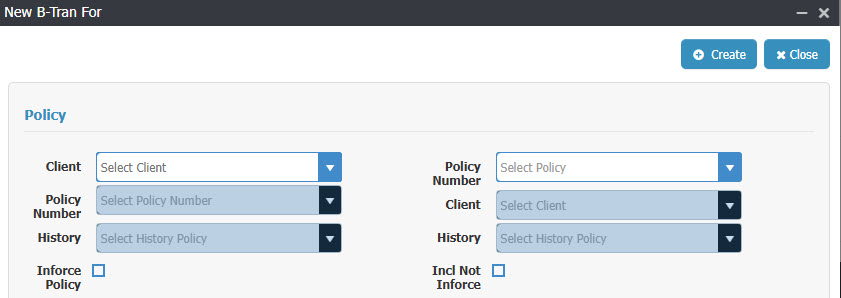
When you click the button a window pops up to choose the Client & Policy the B-Tran is being attached to. You can either first select the client and then select from that clients policies, or you can just enter the policy number which auto-selects the client...

If you have the policy number, it's just one step to start the process of creating the new Quick B-Tran.

We also give you the ability to select a history policy which is important for audits and doing a B-Tran for the previous policy term. The B-Tran is tied to the policy term.

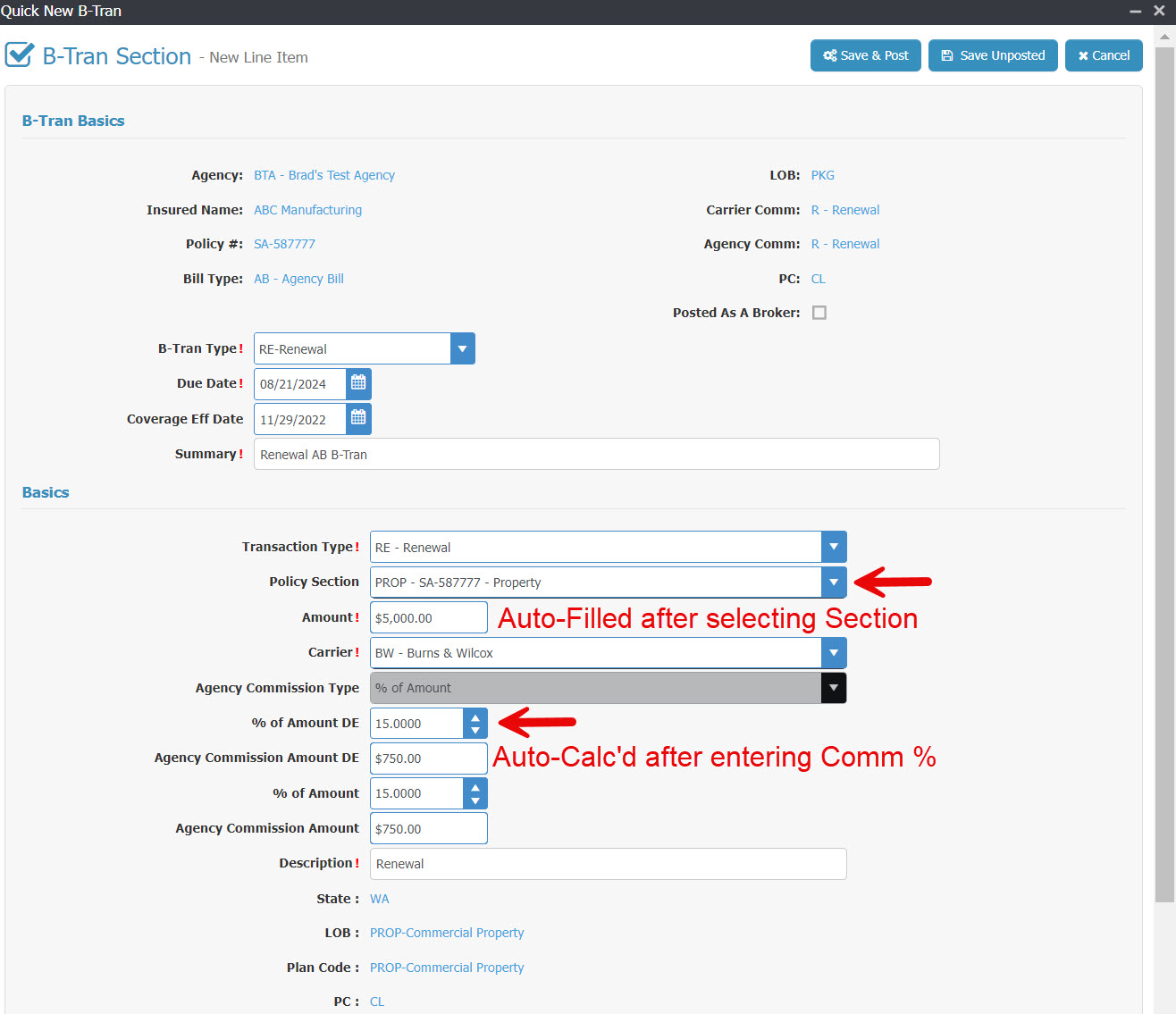
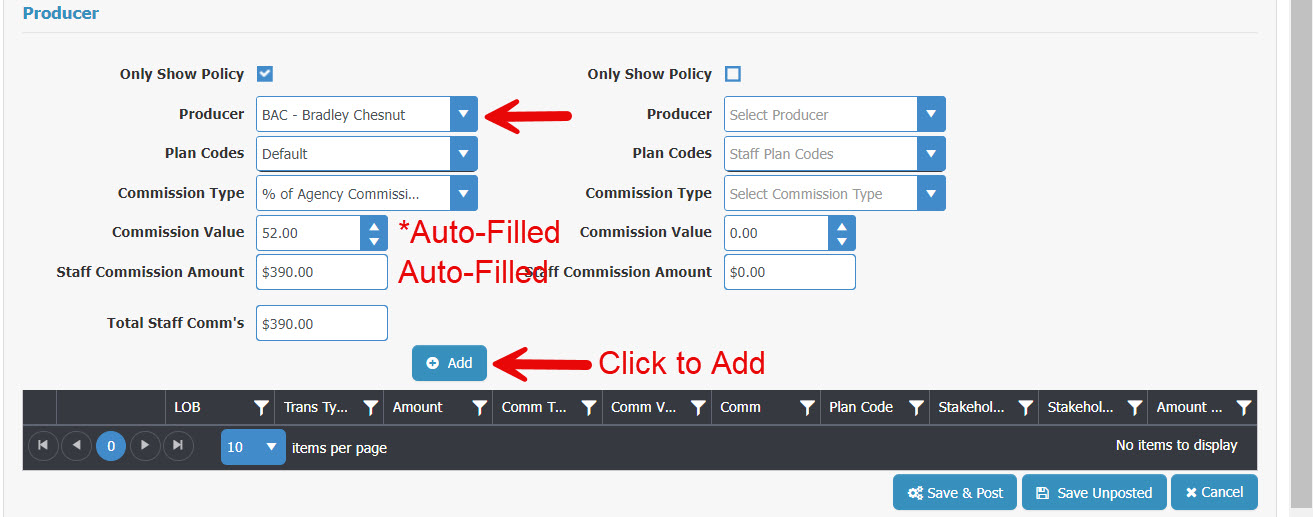
You're then taken to the Quick B-Tran Window... (2 images to show)

In the images, the fields not pointed out auto-fill. You can see which can be edited.

The fields with an arrow pointing to it you'll either select from a pull-down selection window, edit the field or click the button.

The field where we added, "*Auto-Filled" (with asterisk), it's auto-populated when you select the producer with their default commission % but you can override this field.

You can add multiple producers to this B-Tran.

This B-Tran, if Posted, will now show up on the grid to be included in the reconciliation of the commission statement!

The large agency owners and staff are in pure "awe" of these new features!

Other Features We've Added

Commission Downloading

We also added Commission Downloading which is another major time saving feature in CP Manager. At this point there are now 3 different ways a B-Tran can be created...

  1. Manually (MAN)
  2. Policy Download (PD): Optional. If selected, can choose to include Producer commissions (uses their default commission %)
  3. Commission Download (CDL). Can choose to include Producer commissions (uses their default commission %)

To go with Commission Downloading we also include the Commission Download log & a Commission Download Orphan window.

Premium Financing

We now offer 3 ways to handle Premium Financed policies...

  1. Premium Finance Company Pays Carrier Directly
  2. Agency Collects Premium Finance Amount From The Premium Finance Company & Sends To Carrier
  3. Client Sends Full Amount to Premium Finance Company, Premium Finance Company sends Commission to Agency.

Each is handled differently in an accounting system so we created routines to support each.

Producer Chargebacks

We added a process to handle Producer Chargebacks where the accounting only affects the producer and not the agency. This is very different than a Cancellation where it subtracts the Premium, does an agency commission chargeback and a producer commission charge back.

This special producer chargeback feature only affects the producers commissions!

Increasing Productivity

The last thing I want to share (I find most people don't read huge lists of enhancement updates) is we continued to add more features to increase your productivity and make doing your job easier. Hundreds of little changes throughout the system will allow you to further increase your productivity.

If there's one thing Mr. Chesnut is absolutely 100% committed to, it's helping agencies to have a highly productive and efficient agency!

Check out CP Manager. Believe me, you'll be really glad you did.

Pros and Cons of Management Systems

management systems

Pros and Cons of Management Systems for Insurance Agencies

Technology has transformed how insurance agencies operate, and at the heart of this transformation are management systems. The right system can streamline operations, improve client relationships, and increase profitability. But as with any major business decision, there are both pros and cons to consider.

The Pros of Management Systems

1. Simplicity and Organization
Management systems centralize client, policy, carrier, and accounting information. Instead of juggling spreadsheets, sticky notes, or multiple disconnected programs, everything your team needs is in one place. This reduces wasted time and makes serving clients faster and easier.

2. Improved Marketing and Client Communication
Strong client relationships are built on consistent communication. Management systems allow agencies to automate routine messages—renewal reminders, policy updates, birthday greetings—while also supporting more personalized outreach. This helps you retain more clients while creating opportunities for cross-selling.

3. Increased Productivity and Profitability
Your staff’s time is your largest expense. The more efficiently they can process renewals, endorsements, claims, and other policy tasks the more clients they can serve without adding more payroll. A good management system eliminates double entry, speeds up workflows, and allows CSRs and producers to focus on revenue-generating activities instead of fighting with outdated software.

4. Smarter Cross-Selling Opportunities
Because client and policy data is organized in one system, management systems make it easy to identify coverage gaps. This makes cross-selling simpler, giving your agency a predictable way to grow revenue without needing new leads.

5. Better Decision-Making
With dashboards, reports, and analytics built in, management systems provide insights into productivity, book of business mix, and profitability. This visibility allows owners to make smarter decisions for growth and resource allocation.

The Cons of Management Systems

While the benefits are clear, it’s also important to acknowledge potential challenges:

  • Poor Vendor Support: If the vendor isn’t responsive or helpful, implementation and ongoing use can be frustrating.
  • Complexity of Bad Systems: Not all management systems are designed with ease of use in mind. A clunky, hard-to-learn system can slow staff down instead of speeding them up. Hard to use systems also make it time-consuming to hire and train new staff.
  • Data Conversion Challenges: Moving data from your old system can be stressful if not managed properly. This is why choosing a vendor with experience and a proven process is critical.

In short: the “con” isn’t in using a management system—it’s in using the wrong one.

Choosing the Right Management System

The best management systems are built specifically for insurance agencies. They combine ease-of-use, single-entry workflows, strong commercial and personal lines management, accounting, and downloads—all designed to maximize productivity.

That’s why we built CP Manager. With over 30 years of experience in insurance automation, we engineered CP Manager from the ground up to eliminate inefficiencies, streamline workflows, and help agencies increase profitability—without the headaches most systems create.

Schedule a Walk-Through Today

The Foundation To CP Manager

The Foundation To CP Manager

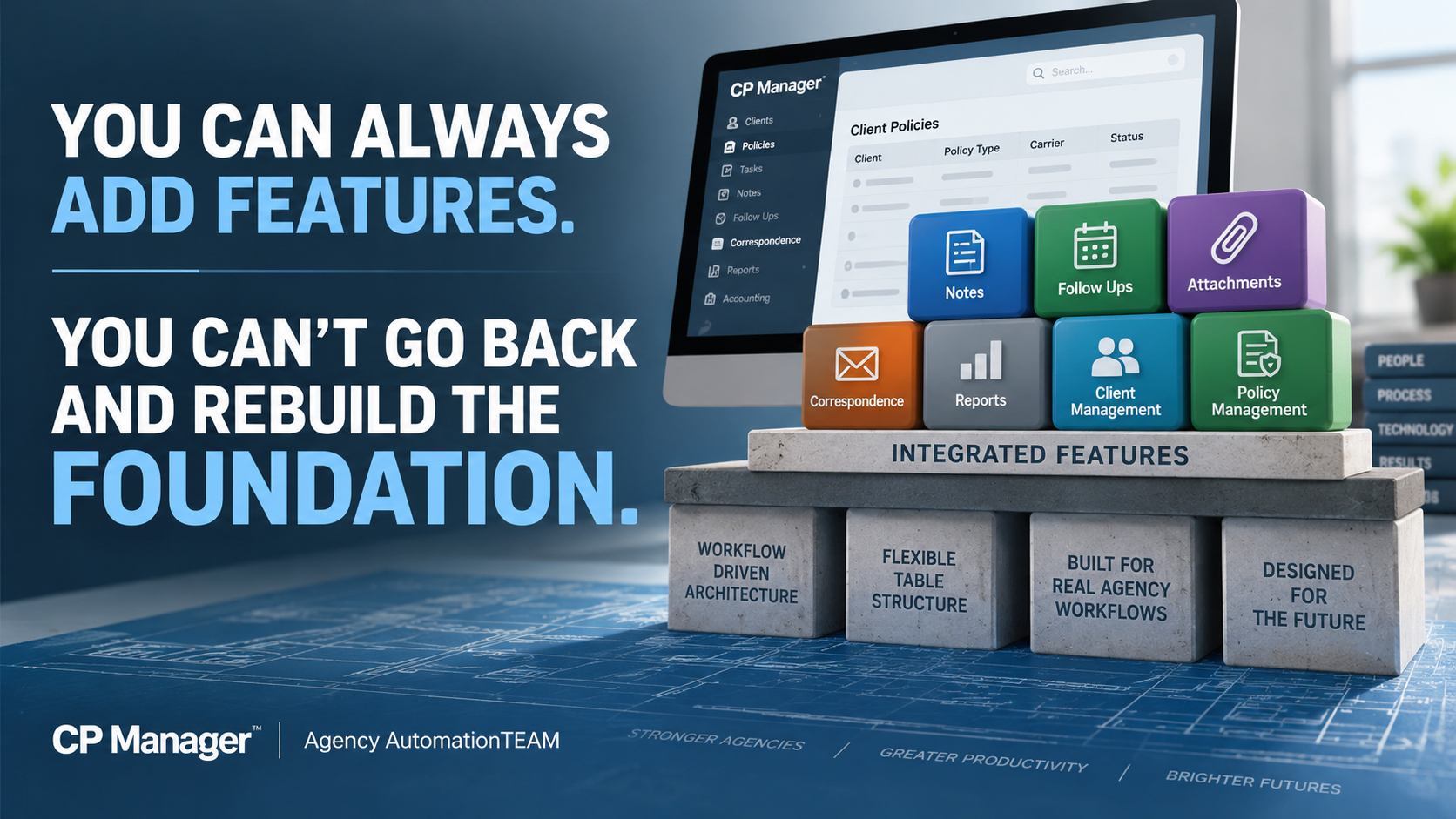
The foundation to CP Manager's design was based upon workflows and productivity strategies. This is why it took over 10 years to develop instead of the typical 1-1.5 years for feature driven systems.

When faced with an economy like we are today, nothing will do more to help you survive it than increasing the productivity of your staff! This is because...

Increased productivity equals increased profitability."

Watch video to learn more...

Click the following video to learn more...

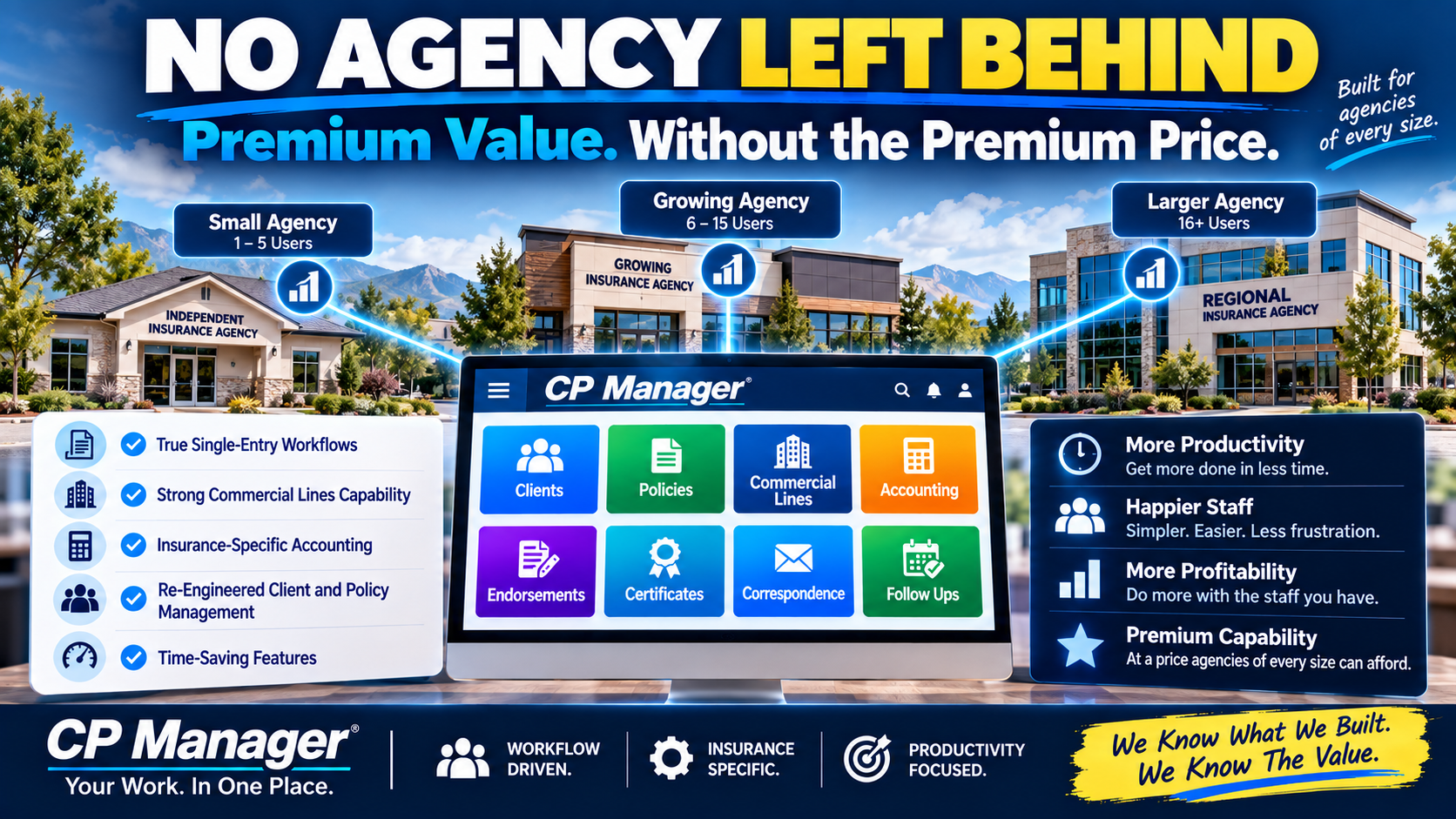
We Know The Value – No Agency Left Behind

No Agency Left Behind: Why CP Manager Delivers Premium Value Without the Premium Price

As an insurance automation consultant, I’ve seen it countless times: small agencies on tight budgets need a productive system even more than large agencies do.

But too often, they’ve been forced to settle for a system that fits their budget instead of one that actually fits their needs.

That stops here.

We know exactly what CP Manager is worth. It should be priced alongside the most expensive systems on the market.

But we also know what agencies really need — and we refuse to let price be the barrier. That’s why we’ve adopted a simple philosophy: No Agency Left Behind.

Why High-End Systems Cost More — and Why CP Manager Gives You the Same (or Better)

After decades of reviewing systems, I’ve seen the differences that separate low-cost systems from higher-end ones. The biggest areas?

1. True Single-Entry Workflows

Cheap systems have a lot of double- or triple-entry. Higher-end systems spend more time (and money) mapping fields so data flows everywhere it needs to go.

CP Manager is one of the most single-entry systems ever designed. Enter data once, and it’s instantly available wherever you need it. That’s hours saved every week.

2. Commercial Lines Powerhouse

Handling complex commercial policies with multiple sections, drivers, vehicles, and schedules is where most systems simply break down.

When CP Manager was designed we knew the complexity of the Commercial Lines package policy. This is why we started with commercial lines when we wrote the policy side of CP Manager.

Monoline policies is easy. Commercial package policies are a whole other ballgame!

3. Insurance-Specific Accounting

General accounting tools like QuickBooks can’t handle commission reconciliation, trust transactions, return premiums, or carrier sweeps.

CP Manager’s accounting was designed by one of the top insurance accounting experts in the industry. Today, we offer full sub-ledger accounting and will expand to full accounting in our upcoming release. Either way, you get accuracy you can rely on.

The Value We Built In

The truth is, CP Manager should cost what the “big-name” systems do...

... It’s the first workflow-driven system in this industry.

... It re-engineers client and policy management from the ground up.

... It’s packed with exclusive, time-saving features.

... And it delivers the highest ROI of any system because of how much more productive your staff will be.

By every measure, it’s a premium system.

Why We Priced It Differently

But here’s the difference:

  • Small agencies shouldn’t be locked out of productivity because of price.
  • Large agencies shouldn’t overpay and still be stuck with inefficiencies.
  • Growing agencies shouldn’t face costly conversions and steep learning curves when they’re ready to scale.

That’s why CP Manager is priced so that any agency, regardless of size, can afford it.

No Agency Left Behind

We know what we built

We know the value

And we know the impact it can have on your productivity and profitability.

We also know the industry needs a new standard — where every agency has access to the tools that let them compete and thrive.

That’s why we took the posture of No Agency Left Behind.

And it’s why agencies of every size are saying the same thing: CP Manager is going to revolutionize insurance automation.

The Productivity Driven AMS Vs Feature Driven

Productivity Driven Agency Management Systems Vs Feature Driven

Insurance Agencies Have Always Been Workflow Driven

Insurance agencies don’t operate in features. They operate in workflows.

Every day is driven by renewals, endorsements, new business, claims, follow-ups, carrier interactions, and work-in-progress that must move forward without slipping.

For decades, agencies have been forced to adapt those workflows to feature-driven management systems — relying on workarounds, memory, and personal processes just to keep work moving.

That mismatch quietly caps productivity.

CP Manager was designed from the opposite starting point.

After decades of working inside agencies and helping them work around the limitations of traditional systems, CP Manager was built as a workflow-driven management system — designed to align the software to how agency work actually flows.

When the system matches the workflow, productivity stops being forced. It becomes an intregal part of the system.

Why Has It Taken This Long For A Productivity, Workflow Driven System To Be Released?

There are two key reasons why it's taken so long...

First...

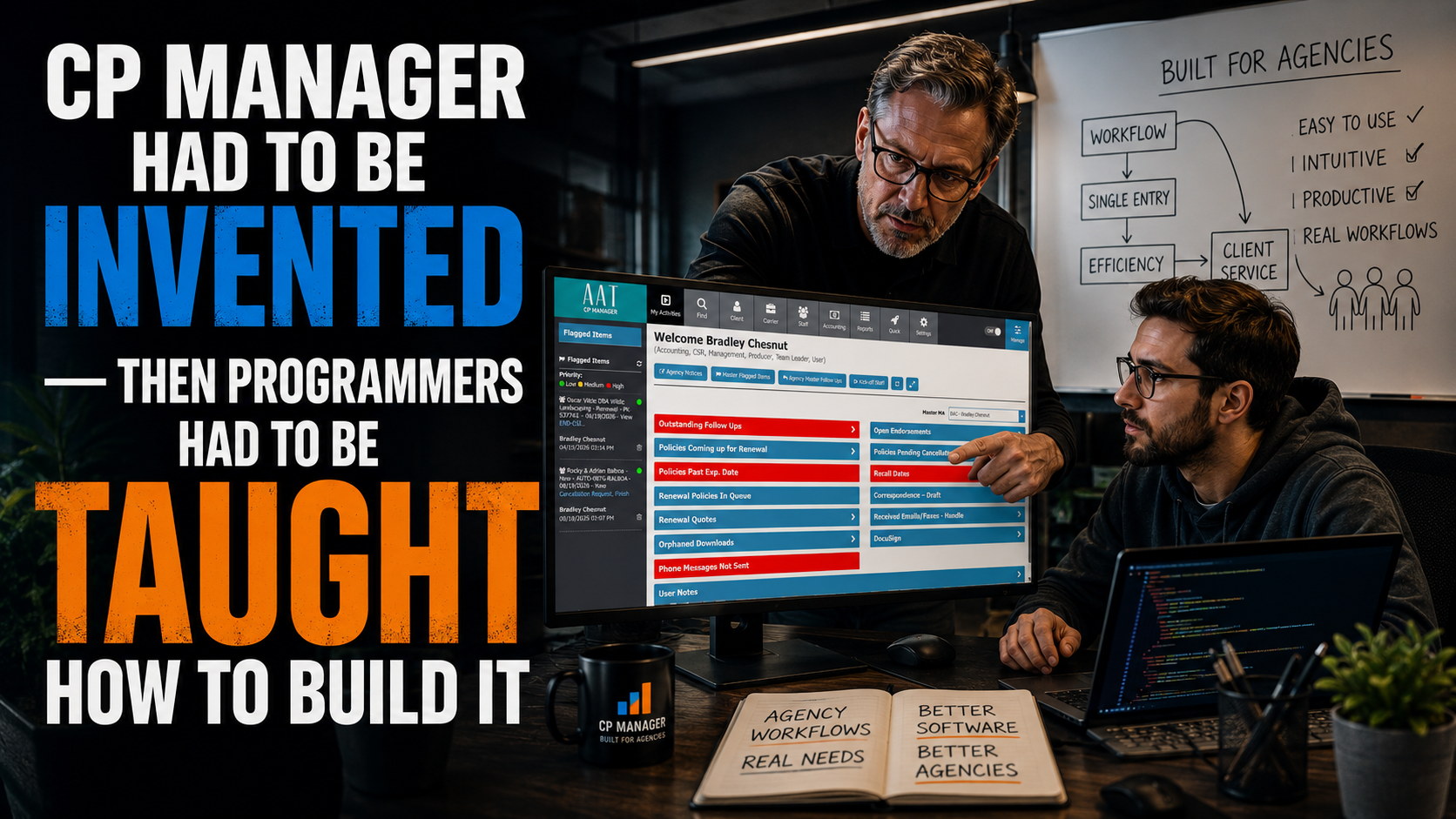
Programmers are only trained to design feature-driven systems... There is no blueprint or training on how to build a productivity-focused, workflow-driven system.

Second...

Until now, there hasn't been anyone with the key skill sets needed to design one... 

  • An extensive background in agency automation and management systems, 
  • A programmer who understands database structures and relational databases, and 
  • Being an expert in workflows and productivity strategies.

While everyone in the industry knew the insurance industry was workflow driven, knowing how to build a workflow productivity-driven system wasn't something they knew how to do.

Instead, vendors created checklists of what an agency management system “needed”—notes, follow-ups, attachments, accounting, etc.—and then set out to plug those features into a client record. This is how pretty much all database programs are created and why they're called "feature-driven".

It’s a straightforward approach, which is why feature-driven systems can often be built and released in just one to two years. Most start with personal lines, sometimes adding a basic version of commercial lines later.

The result?

A system with lots of features on paper, but in practice…

  • Double-entry everywhere
  • Weak commercial lines management
  • Minimal workflow support
  • Little impact on real productivity

That’s why, despite having more than 30 agency management system options on the market today, many agencies still feel stuck using systems that don’t meaningfully make daily work faster or easier.

The Birth of Productivity Driven Systems

The idea behind a productivity-driven agency management system is fundamentally different. Instead of starting with a list of features, you start with workflows—the actual step-by-step processes agency staff perform every day, such as renewals, endorsements, cancellations, and claims.

When building a productivity driven system the approach is completely different.

Rather than listing all of the features needed you instead map out the workflow steps for handling policy tasks and all of the actions/steps involved in the task.

For example, processing an endorsement is very different depending on:

  • Whether you’re downloading from the carrier or not.
  • Whether you have binding authority.
  • Which line of business you’re working with.

Each of those differences changes the workflow. And each workflow step defines what features are actually needed—and how they should function to be more productive.

This workflow-first approach ensures that every feature exists for a reason: to make the CSR’s job faster, easier, and more accurate.

Why Table Structures Matter

As an insurance automation consultant, I’ve seen firsthand how important database table structures are. They determine whether your system can be single-entry, whether workflows can be streamlined, and how data flows between modules.

For years, when I suggested improvements to other vendors, I’d hear:

“Our table structures won’t support that.”

That’s why CP Manager was blueprinted and designed from the ground up—with workflow, single-entry, and productivity baked into its DNA. Before a single line of code was written, I spent 18 months mapping out every workflow, task, and data flow. It was grueling—but necessary to avoid the limitations that have plagued every other agency management system.

Blue-printing a productivity driven system is based upon how an agency would use the system step by step, policy task by policy task (ie, Renewal, Endorsement, Cancellation, Claim, etc.), and what work the agency staff needed to stay on top of so things don't slip through their fingers.

Re-Engineering the Core To An Agency Management System

Because CP Manager was designed as a productivity-driven system, nearly every “standard” feature had to be completely re-engineered:

  • Notes, Follow-Ups, Attachments, Correspondence → tightly integrated and streamlined, and to more effectively support CSRs processing their work.
  • Client Management → designed for speed and single-entry.
  • Policy Management → rebuilt for both personal and commercial lines, with CL as the foundation. Complex package policies are a breeze in CP Manager.
  • Renewals, Endorsements, and Claimsworkflow-driven with the right features to process the task.
  • Accounting → insurance-specific, intuitive, and built around productivity with a lot of business logic behind the scenes to better automate accounting tasks and make it push-button easy.
  • New Innovations → over 30 features never seen before in an agency management system.

The result?

Not only are agencies calling CP Manager “the most insurance-specific system they’ve ever used,” they're ecstatic with the huge drops in their workload because of the huge increase in their productivity.

Why All Of This Matters to Your Agency

The way your management system is designed quietly determines how much work your agency can realistically handle — regardless of how experienced or motivated your staff may be.

When a system is feature-driven, productivity gains depend on people working around the software. Over time, that creates friction: more steps, more windows, more mental tracking, and more reliance on individual memory to keep work moving. As volume increases, those small inefficiencies compound.

That’s when agencies begin to feel stretched even though everyone is working hard.

A workflow-driven system changes that dynamic.

When the system is designed to follow how work actually flows through an agency, productivity is no longer dependent on workarounds or hero effort.

Work-in-progress becomes visible.
Tasks stay connected.
Processes feel more natural instead of forced.

The result isn’t just speed — it’s the amount of work each CSR can handle each day.

Agencies gain the ability to handle more business without automatically adding staff, increasing stress, or losing control over daily operations. Decisions about hiring, growth, and service become intentional instead of reactive.

This distinction matters because productivity ceilings don’t announce themselves.
They show up as pressure, backlog, and the sense that “we’re busy, but not getting ahead.”

Understanding whether your system is helping or quietly limiting your agency is the first step toward changing that.

The Last True Design Change Was In the 1980's

Over the past 40 years, numerous vendors have said they were the next evolution in agency management systems. What constitutes being a "new evolution"?

Changing the programming environment from DOS to windows? Windows to browser-based?

No, those are just changing the environment they operate under. Their layout, structure and how you do your work stayed the same.

The last time there was a major change, a new evolution in agency management systems was in the 1980's when they went from being accounting based to being client-policy driven.

That is until now with CP Manager going from feature-driven to being workflow-driven.

With CP Manager, agencies are reporting faster processing, far less double entry, and smoother daily operations. The system is still feature-rich to support workflows and increasing your productivity. More importantly, it’s built to make agencies more productive and profitable.

Ready to See It in Action?

Don’t settle for another feature-driven agency management system that slows your staff down. Experience the first productivity driven agency management system and see the difference for yourself.

👉 Schedule a Walk-Through of CP Manager

CP Manager Upgrades Summer 2022

CP Manager Upgrades Summer 2022

August 31, 2022 - The summer of 2022 has been another busy 3 months for Agency AutomationTEAM. We added 5 important accounting updates this summer.

Here I'm just going to provide a very quick overview of each. For a detailed explanation schedule a walk-through with your account manager. If you don't have CP Manager yet fill out the form to the right to start the process of learning about how much time and money CP Manager will save you.

Commission AL3 Downloading

Commission downloading streamlines your DB commission statement management with DB Reconciliation.

But we took it a step further by giving you the option in setup to also create the producer commission when the AL3 Commission file is processed and converted to a Billing Transaction (many systems call this an invoice). It will create a producer commission for Producer 1 on the policy and will use the producers commission setup for the producers commission % (what we've done for managing producer commissions is a far more efficient and huge time saver). 

Along with Commission Downloading we've added the following 2 additional features...

Commission Download Log

Here you're only seeing some of the fields available. Scroll right for the rest.

This shows you the status of the Commission AL3 downloads... Processed, Orphan, Error. You'll see all of the files in the image ended up in Orphans, meaning, it couldn't find the policy to link to.

Once you process it from the Orphan window it will update the status to Processed.

You can also create a filter so you can see just the downloaded files associated to a specific date to make sure they equal what you were sent (compare to online/paper statement).

Commission Orphan Management

Here you are processing your Commission downloads which orphaned out. You need to first find the policy associated to this commission download. You can select by Client first, then choose a policy for the selected client; or you can enter the policy # which auto-populates the client. You also need to select the Section for the policy because each download is policy section specific.

The process is very easy and very fast.

When processing a Commission download line-item it creates a B-Tran. You can also have it create the producer commissions by turning this option on at Download Setup.

DB Commission Management Window

We have a client with 60 users who have huge commission statements. Processing their commission statement was a longer process than they wanted it to be. It's not that our DB Reconciliation wasn't very powerful and efficient, it's that there were a lot of different steps which after a conversation with them Mr. Chesnut blueprinted another window to streamline the Commission Statement management.

The agency and Mr. Chesnut had numerous conversations so Mr. Chesnut was very clear on their steps to pinpoint areas where the process could be greatly improved. The end conclusion is the DB Commission Management Window. The agency says this cut their time by a good 50% if not more. This window has proven to be a huge time saver!

There's a lot of very powerful functionality here! Ask to see this in a Walk-Through. It will cut the time you spend processing your DB Commission Statements way down!

The grid in the image is only showing half of the fields on the grid. You'll see you can scroll to the right to see the other half.

Quick B-Tran (Billing Transaction)

To support a much faster way of processing a DB commission statement Mr. Chesnut also blueprinted a quick B-Tran window to create a much faster way of adding a B-Tran which hasn't been added to the system yet (wasn't downloaded or added by user). It's just one window with everything available by scrolling up and down the page. 

It starts by either starting by choosing the Client and then policy, or by entering the policy number which auto-populates the client...

A B-Tran is linked to a policy and pulls information from the policy into the B-Tran. Once you've made your selection from above window the one page B-Tran opens up...

The group "B-Tran Basics" pulls from the policy.

The "Basics" group you finish filling out just like a regular B-Tran.

The "Producer" group you finish filling out like a regular B-Tran. You can add commissions to 2 producers/staff for this line item from here. When done, click "Add" and it adds the information to the Grid below the Add button..

The grid shows you the core information for the line item. If there's a producer commission for the line item there will be an arrow to the left of the Action button you click to open up the producer commissions to see who's being paid what. You can also add another producer commissions here if needed.

Now you scroll back up to "Basic" group and add another line item if needed, like a tax or a fee. Or if this is a package policy with more than one section you can add the line item for the next section of the policy.

All on one page. Very fast, very easy.

By the way, we added the ability to use the Quick B-Tran window from additional places in CP Manager... the Policy, the B-Tran window and from Global B-Trans. Our users are loving us!

Summary

We continue to make improvements, tweak and add new features to CP Manager. Next to be released is our Workflow Task Manager in the next couple of months. This is a feature which will blow you away!