CP Manager Upgrades Summer 2022

CP Manager Upgrades Summer 2022

August 31, 2022 - The summer of 2022 has been another busy 3 months for Agency AutomationTEAM. We added 5 important accounting updates this summer.

Here I'm just going to provide a very quick overview of each. For a detailed explanation schedule a walk-through with your account manager. If you don't have CP Manager yet fill out the form to the right to start the process of learning about how much time and money CP Manager will save you.

Commission AL3 Downloading

Commission downloading streamlines your DB commission statement management with DB Reconciliation.

But we took it a step further by giving you the option in setup to also create the producer commission when the AL3 Commission file is processed and converted to a Billing Transaction (many systems call this an invoice). It will create a producer commission for Producer 1 on the policy and will use the producers commission setup for the producers commission % (what we've done for managing producer commissions is a far more efficient and huge time saver). 

Along with Commission Downloading we've added the following 2 additional features...

Commission Download Log
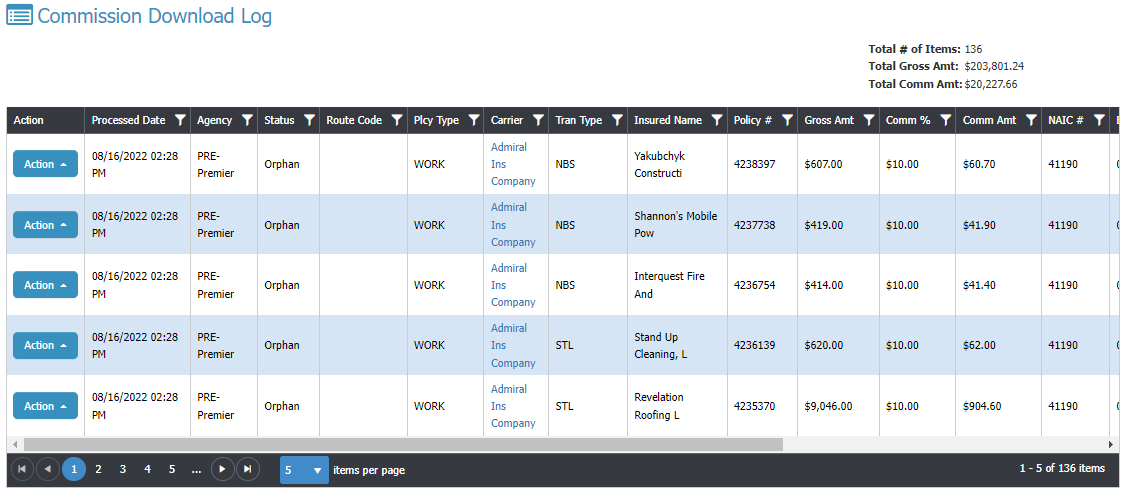
Here you're only seeing some of the fields available. Scroll right for the rest.

This shows you the status of the Commission AL3 downloads... Processed, Orphan, Error. You'll see all of the files in the image ended up in Orphans, meaning, it couldn't find the policy to link to.

Once you process it from the Orphan window it will update the status to Processed.

You can also create a filter so you can see just the downloaded files associated to a specific date to make sure they equal what you were sent (compare to online/paper statement).

Commission Orphan Management
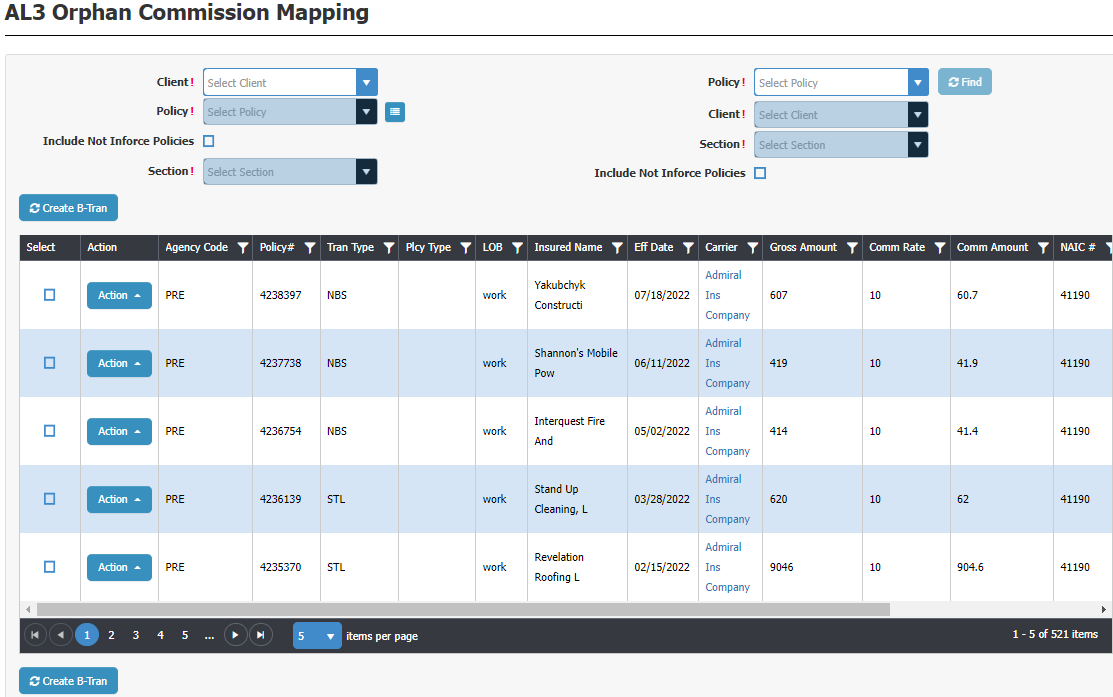
Here you are processing your Commission downloads which orphaned out. You need to first find the policy associated to this commission download. You can select by Client first, then choose a policy for the selected client; or you can enter the policy # which auto-populates the client. You also need to select the Section for the policy because each download is policy section specific.

The process is very easy and very fast.

When processing a Commission download line-item it creates a B-Tran. You can also have it create the producer commissions by turning this option on at Download Setup.

DB Commission Management Window

We have a client with 60 users who have huge commission statements. Processing their commission statement was a longer process than they wanted it to be. It's not that our DB Reconciliation wasn't very powerful and efficient, it's that there were a lot of different steps which after a conversation with them Mr. Chesnut blueprinted another window to streamline the Commission Statement management.

The agency and Mr. Chesnut had numerous conversations so Mr. Chesnut was very clear on their steps to pinpoint areas where the process could be greatly improved. The end conclusion is the DB Commission Management Window. The agency says this cut their time by a good 50% if not more. This window has proven to be a huge time saver!
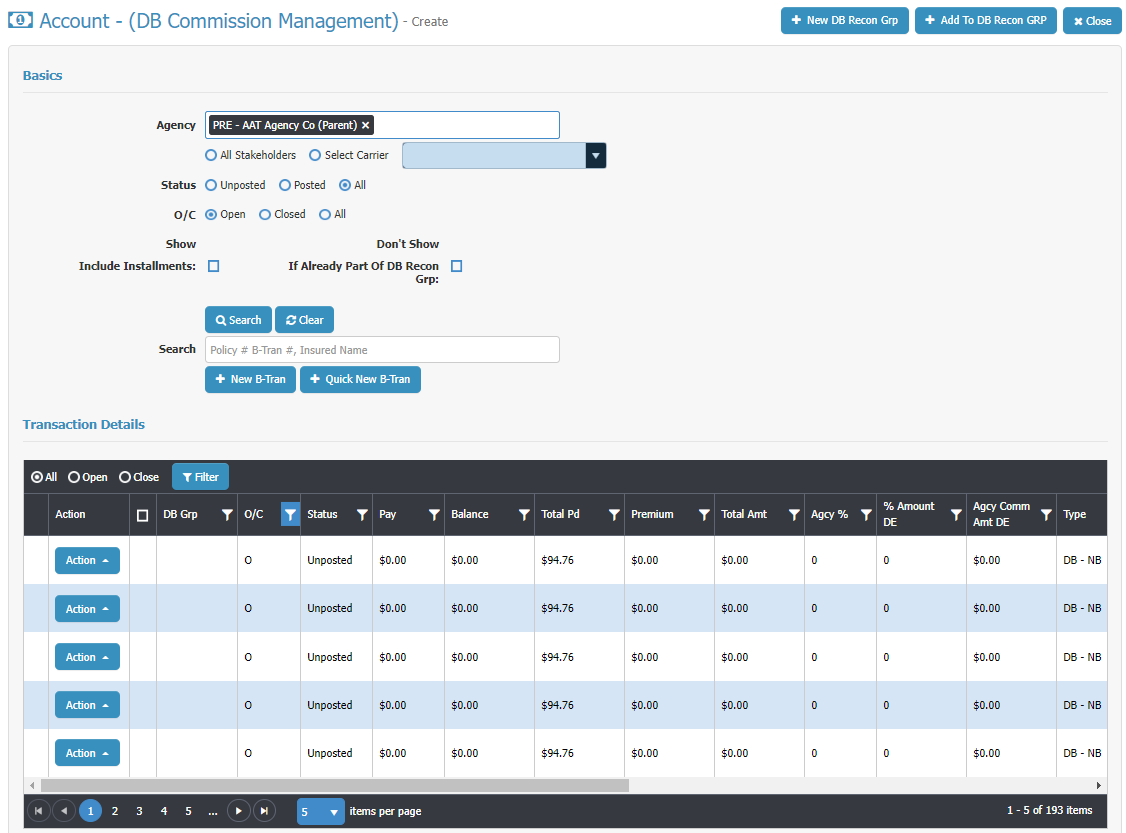
There's a lot of very powerful functionality here! Ask to see this in a Walk-Through. It will cut the time you spend processing your DB Commission Statements way down!

The grid in the image is only showing half of the fields on the grid. You'll see you can scroll to the right to see the other half.

Quick B-Tran (Billing Transaction)

To support a much faster way of processing a DB commission statement Mr. Chesnut also blueprinted a quick B-Tran window to create a much faster way of adding a B-Tran which hasn't been added to the system yet (wasn't downloaded or added by user). It's just one window with everything available by scrolling up and down the page. 

It starts by either starting by choosing the Client and then policy, or by entering the policy number which auto-populates the client...
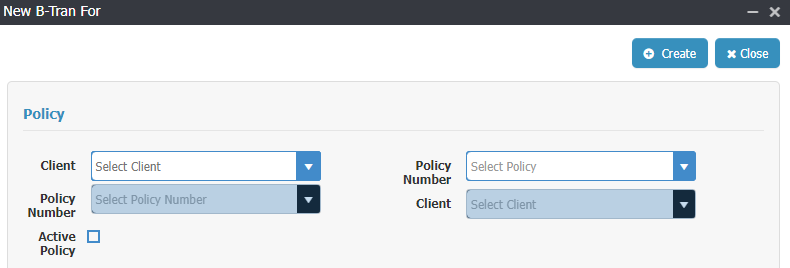
A B-Tran is linked to a policy and pulls information from the policy into the B-Tran. Once you've made your selection from above window the one page B-Tran opens up...
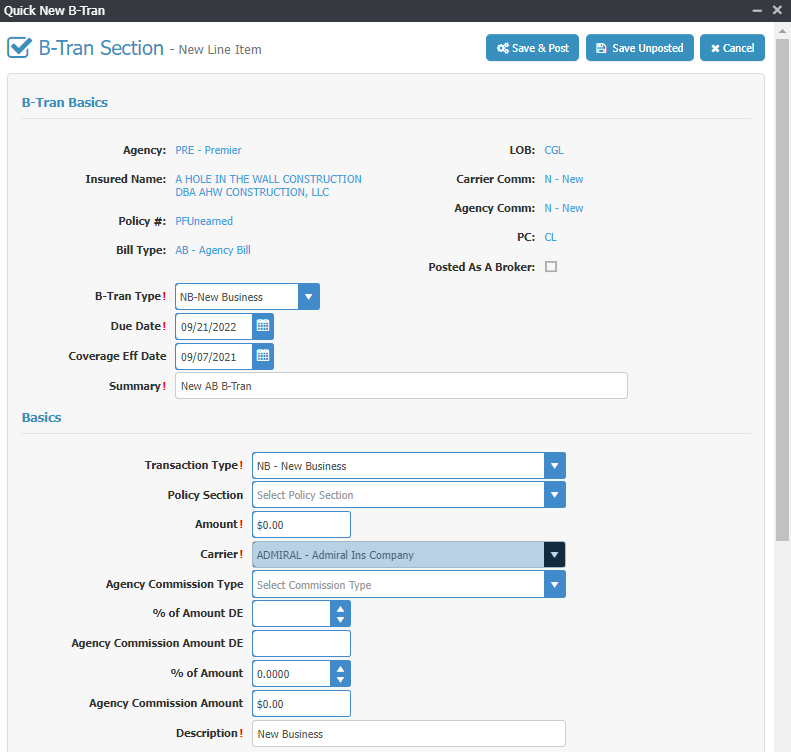
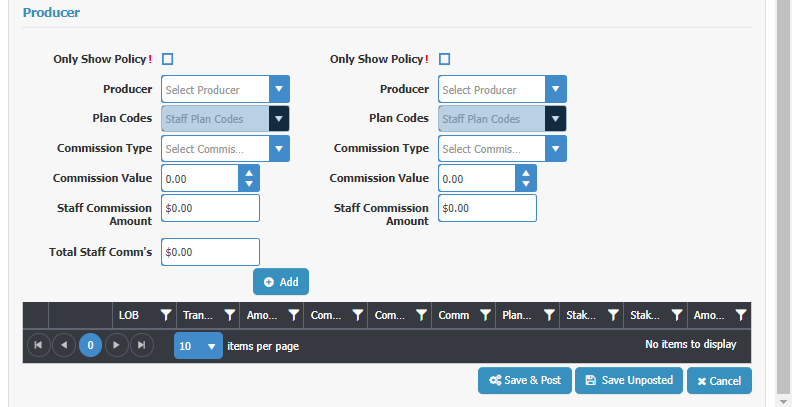
The group "B-Tran Basics" pulls from the policy.

The "Basics" group you finish filling out just like a regular B-Tran.

The "Producer" group you finish filling out like a regular B-Tran. You can add commissions to 2 producers/staff for this line item from here. When done, click "Add" and it adds the information to the Grid below the Add button..
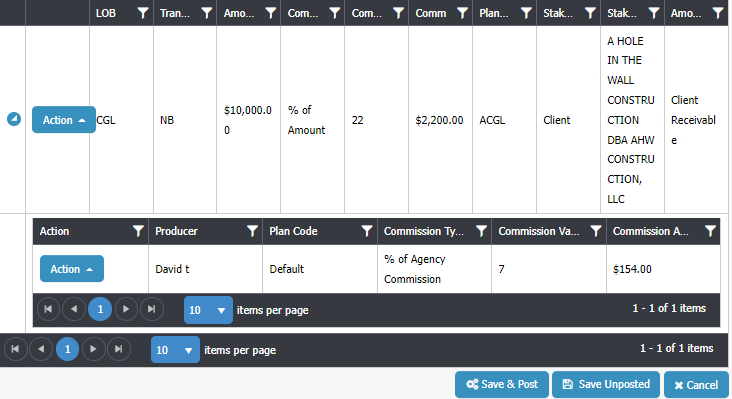
The grid shows you the core information for the line item. If there's a producer commission for the line item there will be an arrow to the left of the Action button you click to open up the producer commissions to see who's being paid what. You can also add another producer commissions here if needed.

Now you scroll back up to "Basic" group and add another line item if needed, like a tax or a fee. Or if this is a package policy with more than one section you can add the line item for the next section of the policy.

All on one page. Very fast, very easy.

By the way, we added the ability to use the Quick B-Tran window from additional places in CP Manager... the Policy, the B-Tran window and from Global B-Trans. Our users are loving us!

Summary

We continue to make improvements, tweak and add new features to CP Manager. Next to be released is our Workflow Task Manager in the next couple of months. This is a feature which will blow you away!

CP Manager Adds Commission Downloading

CP Manager Now Offers Commission Downloading

August 31, 2022 - By popular demand, we've added Commission AL3 Downloading! Making sure you get paid and producers are paid just got a whole lot easier, and much faster. It's another task which is automated saving you from needing to do it.

Here I'm just going to provide a very quick overview of each. For a detailed explanation schedule a walk-through with your account manager. If you don't have CP Manager yet fill out the form to the right to start the process of learning about how much time and money CP Manager will save you.

Commission AL3 Downloading

Commission downloading streamlines your DB commission statement management with DB Reconciliation.

But we took it a step further by giving you the option in setup to also create the producer commission when the AL3 Commission file is processed and converted to a Billing Transaction (many systems call this an invoice). It will create a producer commission for Producer 1 on the policy and will use the producers commission setup for the producers commission % (what we've done for managing producer commissions is a far more efficient and huge time saver). 

Along with Commission Downloading we've added the following 2 additional features...

Commission Download Log

Here you're only seeing some of the fields available. Scroll right for the rest.

This shows you the status of the Commission AL3 downloads... Processed, Orphan, Error. You'll see all of the files in the image ended up in Orphans, meaning, it couldn't find the policy to link to.

Once you process it from the Orphan window it will update the status to Processed.

You can also create a filter so you can see just the downloaded files associated to a specific date to make sure they equal what you were sent (compare to online/paper statement).

Commission Orphan Management

Here you are processing your Commission downloads which orphaned out. You need to first find the policy associated to this commission download. You can select by Client first, then choose a policy for the selected client; or you can enter the policy # which auto-populates the client. You also need to select the Section for the policy because each download is policy section specific.

The process is very easy and very fast.

When processing a Commission download line-item it creates a B-Tran. You can also have it create the producer commissions by turning this option on at Download Setup.

Summary

We continue to make improvements, tweak and add new features to CP Manager. Next to be released is our Workflow Task Manager in the next couple of months. This is a feature which will blow you away!
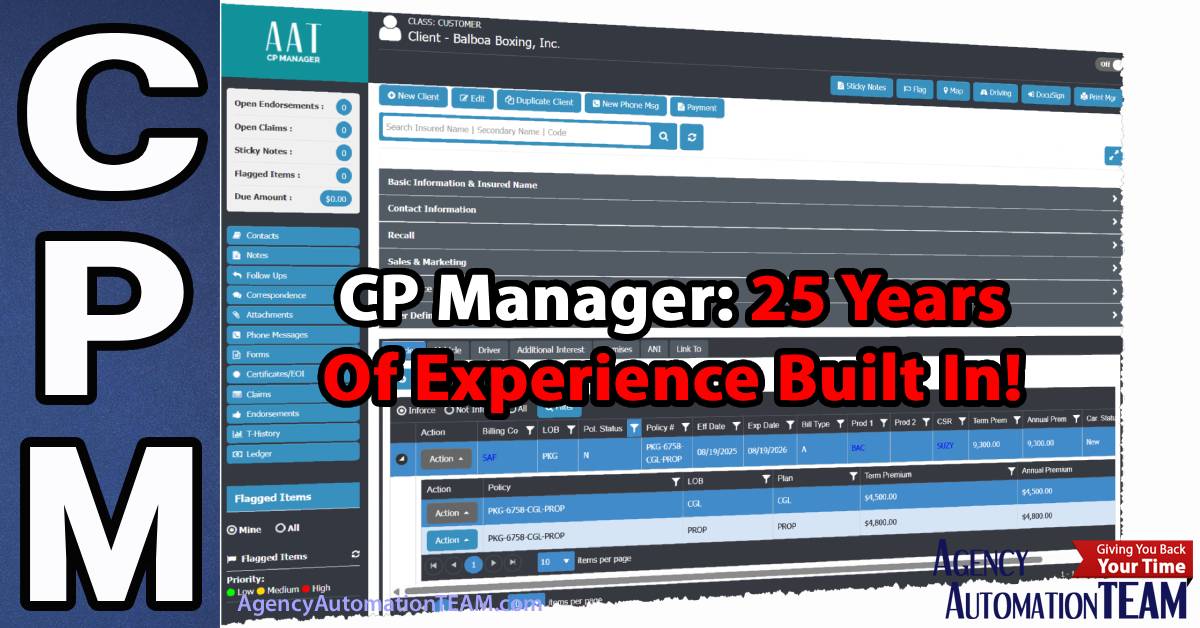
CP Manager: 25 Years Of Experience Built In!

CP Manager

CP Manager: 25 Years Of Experience Built In!

When you choose an agency management system, you’re not just choosing software — you’re choosing the experience and expertise behind it. CP Manager isn’t new. It’s the result of over 25 years of working with agencies, workflows, and automation strategies to create one of the most productivity-driven systems on the market.

Unlike vendors who are still figuring things out years after launch, CP Manager was built on decades of lessons learned. Our President, Bradley Chesnut, played a key role in bringing two other agency management systems from startup to market leaders. Along the way, he saw firsthand:

  • The strengths and weaknesses of different systems
  • What agencies truly need (and what many vendors get wrong)
  • How poor design choices increase double entry, slow down workflows, and frustrate CSRs
  • The difference between adding features and building real productivity into a system

Those years of consulting and working with agencies revealed a consistent truth: most management systems are designed to provide features, not productivity. They help agencies “check the boxes,” but they don’t streamline workflows, reduce training time, or support the way agency staff actually work.

That’s why CP Manager was designed differently. From the very beginning, the goal was clear: create a system that makes agencies faster, more efficient, and easier to train on. A system where productivity isn’t an afterthought — it’s the foundation.

The result? Many say CP Manager feels like a “version 4 or 5” release, not a first-generation system. It combines deep industry knowledge with proven automation strategies to deliver:

  • True single-entry efficiency
  • Workflow-driven design that mirrors how agencies really process business
  • Faster onboarding and lower training overhead
  • Tools that help staff get more done in less time — without frustration

Experience the CP Manager Difference Yourself

It's not just another management system — it’s the culmination of decades of real-world agency experience. Schedule a walk-through today and see how CP Manager can help your team handle more work, with less effort.

CP Manager 2018 Has Been Released

CPManager h

The CP Manager 2018 R-1 Has Been Released! 

What’s Exciting is Our First Release Is Leap Years Ahead of The Majority of Other Systems. 

We’ve Only Just Begun With Product Features to Make Your Job Easier, Faster and Help You To Massively Increase the Profits In YOUR Agency!

Spokane, WA – September 15, 2018 After spending over a year designing CP Manager, going through three programming teams to have the system I envisioned written, we’re releasing CP Manager 2018 R-1.

Our vision from day one has been to create the easiest-to-use and most productive system on the market. Considering there’s never been a system designed by insurance automation consultants before who thoroughly understand automation, productivity strategies and agency workflows, we’ve succeed in achieving these (and numerous other) goals!

Read more