CP Manager Upgrades Summer 2022

CP Manager Upgrades Summer 2022

August 31, 2022 - The summer of 2022 has been another busy 3 months for Agency AutomationTEAM. We added 5 important accounting updates this summer.

Here I'm just going to provide a very quick overview of each. For a detailed explanation schedule a walk-through with your account manager. If you don't have CP Manager yet fill out the form to the right to start the process of learning about how much time and money CP Manager will save you.

Commission AL3 Downloading

Commission downloading streamlines your DB commission statement management with DB Reconciliation.

But we took it a step further by giving you the option in setup to also create the producer commission when the AL3 Commission file is processed and converted to a Billing Transaction (many systems call this an invoice). It will create a producer commission for Producer 1 on the policy and will use the producers commission setup for the producers commission % (what we've done for managing producer commissions is a far more efficient and huge time saver). 

Along with Commission Downloading we've added the following 2 additional features...

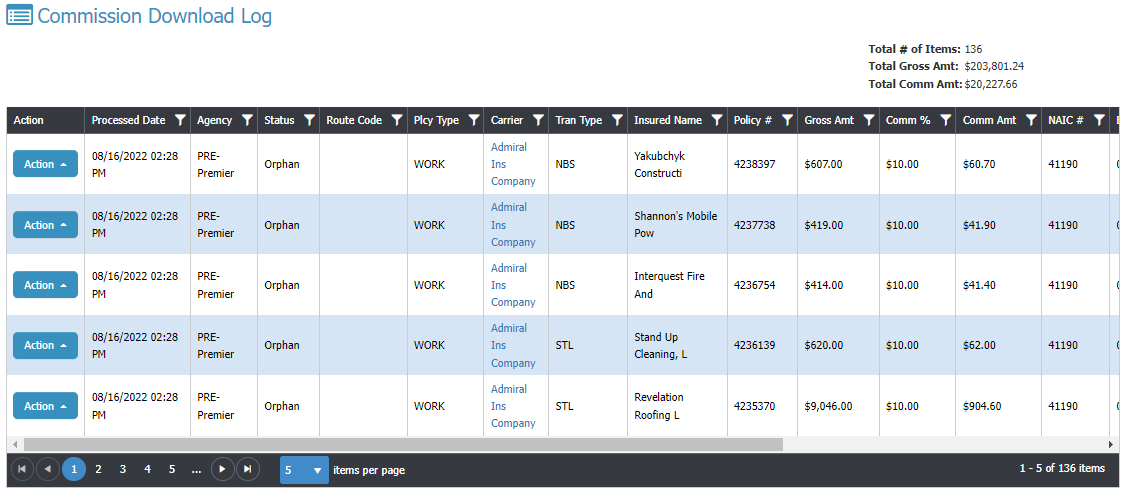
Commission Download Log

Here you're only seeing some of the fields available. Scroll right for the rest.

This shows you the status of the Commission AL3 downloads... Processed, Orphan, Error. You'll see all of the files in the image ended up in Orphans, meaning, it couldn't find the policy to link to.

Once you process it from the Orphan window it will update the status to Processed.

You can also create a filter so you can see just the downloaded files associated to a specific date to make sure they equal what you were sent (compare to online/paper statement).

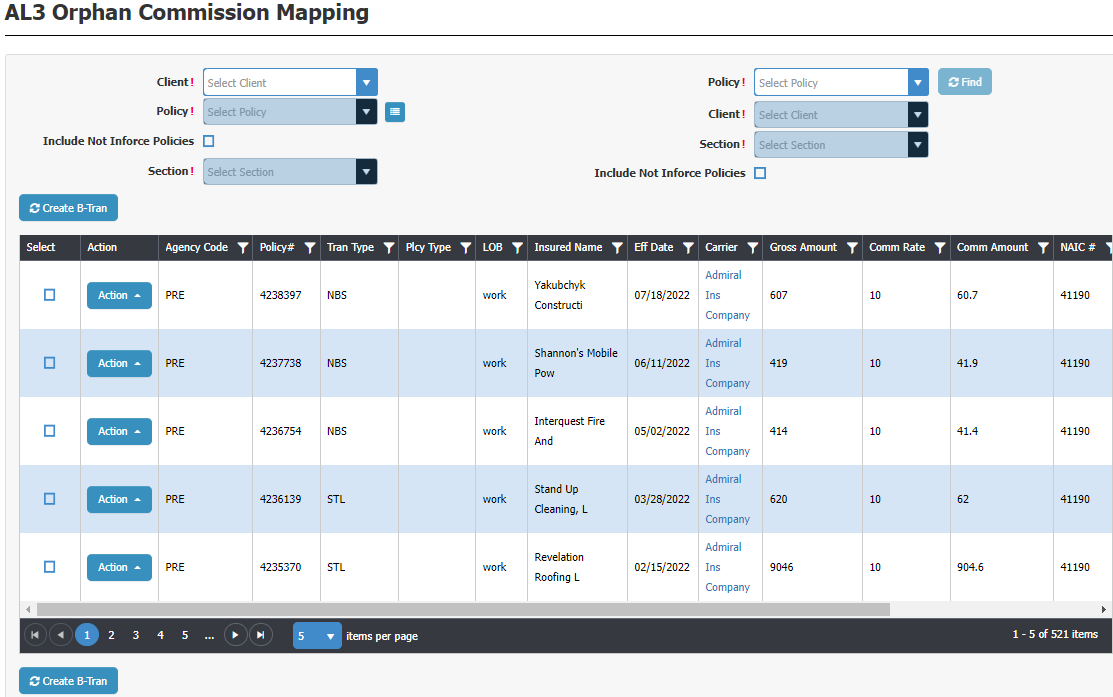
Commission Orphan Management

Here you are processing your Commission downloads which orphaned out. You need to first find the policy associated to this commission download. You can select by Client first, then choose a policy for the selected client; or you can enter the policy # which auto-populates the client. You also need to select the Section for the policy because each download is policy section specific.

The process is very easy and very fast.

When processing a Commission download line-item it creates a B-Tran. You can also have it create the producer commissions by turning this option on at Download Setup.

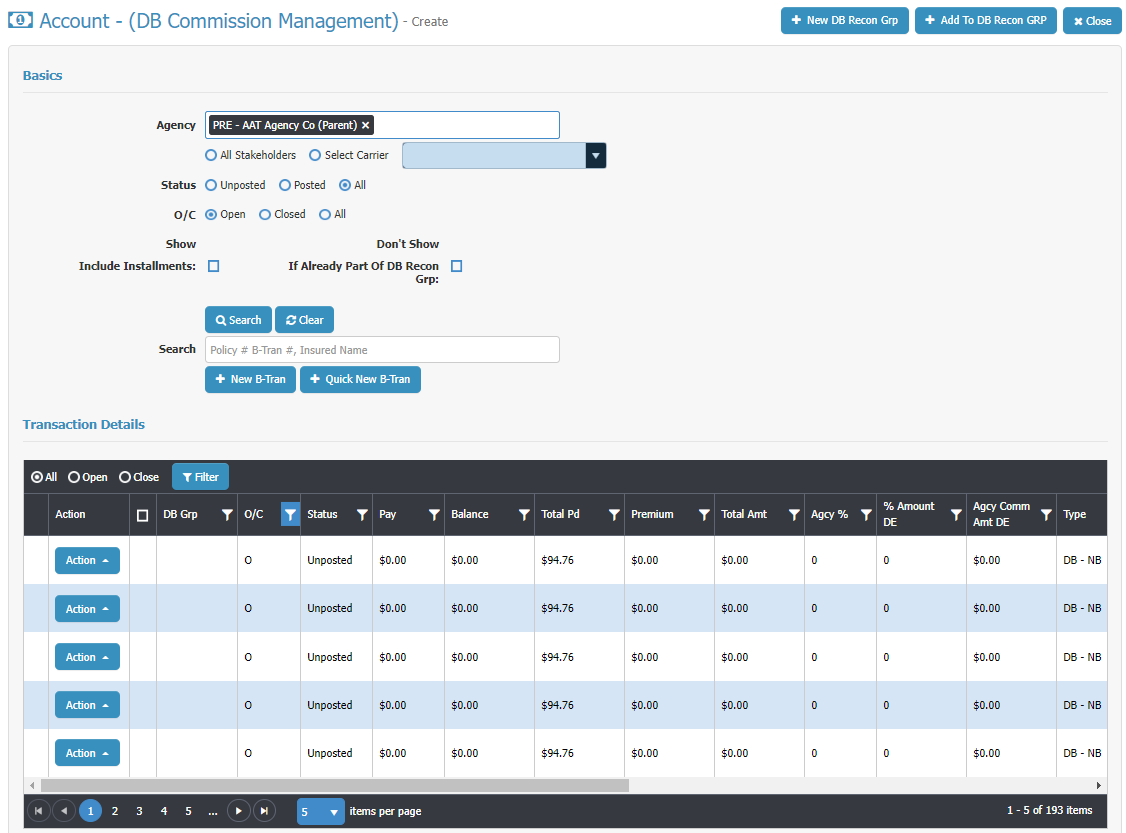
DB Commission Management Window

We have a client with 60 users who have huge commission statements. Processing their commission statement was a longer process than they wanted it to be. It's not that our DB Reconciliation wasn't very powerful and efficient, it's that there were a lot of different steps which after a conversation with them Mr. Chesnut blueprinted another window to streamline the Commission Statement management.

The agency and Mr. Chesnut had numerous conversations so Mr. Chesnut was very clear on their steps to pinpoint areas where the process could be greatly improved. The end conclusion is the DB Commission Management Window. The agency says this cut their time by a good 50% if not more. This window has proven to be a huge time saver!

There's a lot of very powerful functionality here! Ask to see this in a Walk-Through. It will cut the time you spend processing your DB Commission Statements way down!

The grid in the image is only showing half of the fields on the grid. You'll see you can scroll to the right to see the other half.

Quick B-Tran (Billing Transaction)

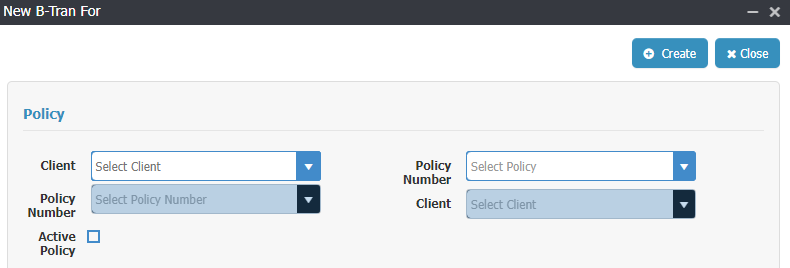
To support a much faster way of processing a DB commission statement Mr. Chesnut also blueprinted a quick B-Tran window to create a much faster way of adding a B-Tran which hasn't been added to the system yet (wasn't downloaded or added by user). It's just one window with everything available by scrolling up and down the page. 

It starts by either starting by choosing the Client and then policy, or by entering the policy number which auto-populates the client...

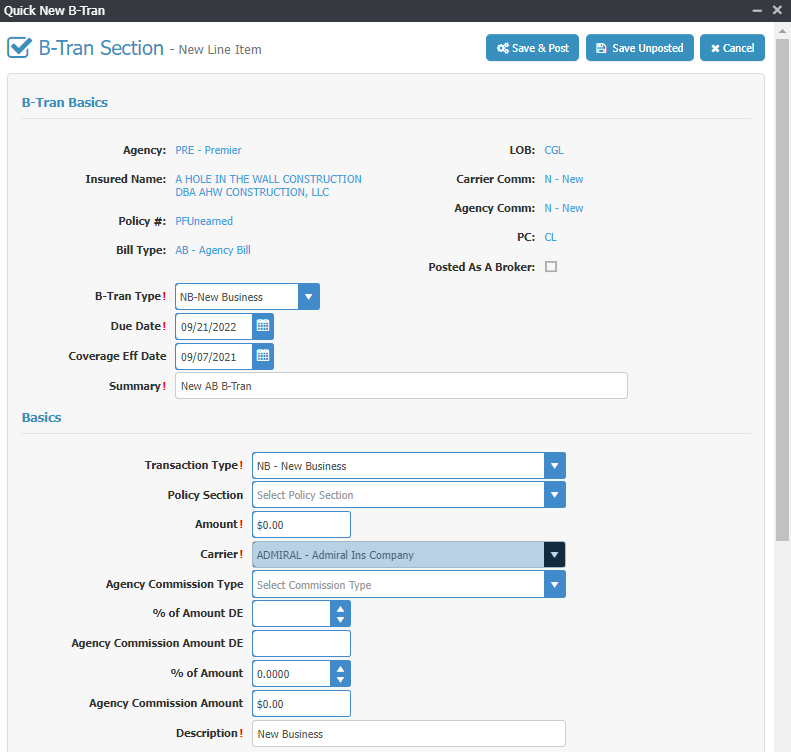
A B-Tran is linked to a policy and pulls information from the policy into the B-Tran. Once you've made your selection from above window the one page B-Tran opens up...

The group "B-Tran Basics" pulls from the policy.

The "Basics" group you finish filling out just like a regular B-Tran.

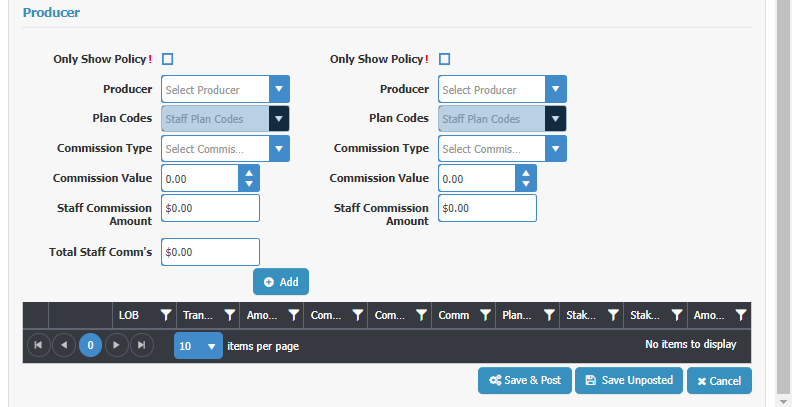
The "Producer" group you finish filling out like a regular B-Tran. You can add commissions to 2 producers/staff for this line item from here. When done, click "Add" and it adds the information to the Grid below the Add button..

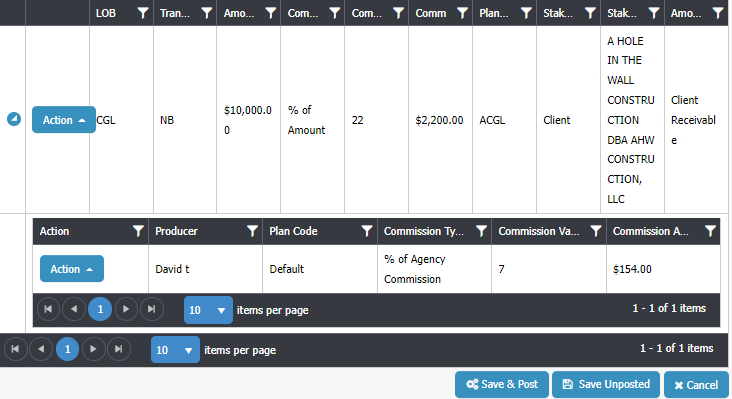
The grid shows you the core information for the line item. If there's a producer commission for the line item there will be an arrow to the left of the Action button you click to open up the producer commissions to see who's being paid what. You can also add another producer commissions here if needed.

Now you scroll back up to "Basic" group and add another line item if needed, like a tax or a fee. Or if this is a package policy with more than one section you can add the line item for the next section of the policy.

All on one page. Very fast, very easy.

By the way, we added the ability to use the Quick B-Tran window from additional places in CP Manager... the Policy, the B-Tran window and from Global B-Trans. Our users are loving us!

Summary

We continue to make improvements, tweak and add new features to CP Manager. Next to be released is our Workflow Task Manager in the next couple of months. This is a feature which will blow you away!

CP Manager Adds Commission Downloading

CP Manager Now Offers Commission Downloading

August 31, 2022 - By popular demand, we've added Commission AL3 Downloading! Making sure you get paid and producers are paid just got a whole lot easier, and much faster. It's another task which is automated saving you from needing to do it.

Here I'm just going to provide a very quick overview of each. For a detailed explanation schedule a walk-through with your account manager. If you don't have CP Manager yet fill out the form to the right to start the process of learning about how much time and money CP Manager will save you.

Commission AL3 Downloading

Commission downloading streamlines your DB commission statement management with DB Reconciliation.

But we took it a step further by giving you the option in setup to also create the producer commission when the AL3 Commission file is processed and converted to a Billing Transaction (many systems call this an invoice). It will create a producer commission for Producer 1 on the policy and will use the producers commission setup for the producers commission % (what we've done for managing producer commissions is a far more efficient and huge time saver). 

Along with Commission Downloading we've added the following 2 additional features...

Commission Download Log

Here you're only seeing some of the fields available. Scroll right for the rest.

This shows you the status of the Commission AL3 downloads... Processed, Orphan, Error. You'll see all of the files in the image ended up in Orphans, meaning, it couldn't find the policy to link to.

Once you process it from the Orphan window it will update the status to Processed.

You can also create a filter so you can see just the downloaded files associated to a specific date to make sure they equal what you were sent (compare to online/paper statement).

Commission Orphan Management

Here you are processing your Commission downloads which orphaned out. You need to first find the policy associated to this commission download. You can select by Client first, then choose a policy for the selected client; or you can enter the policy # which auto-populates the client. You also need to select the Section for the policy because each download is policy section specific.

The process is very easy and very fast.

When processing a Commission download line-item it creates a B-Tran. You can also have it create the producer commissions by turning this option on at Download Setup.

Summary

We continue to make improvements, tweak and add new features to CP Manager. Next to be released is our Workflow Task Manager in the next couple of months. This is a feature which will blow you away!

Our Journey: How We Ended Up Here

Our Journey: How We Ended Up Here

Phase 1: Running My Own Agency (1986–1989)

In 1986, I was running one of the fastest-growing agencies in town. Growth was great, but time was not my friend. My staff and I were constantly behind, staying late, and hiring more CSRs just to keep up — which eroded profits.

I knew something had to change.

That’s when my fascination with computers turned into a mission. I bought my first computer (a $2,300 “top-of-the-line” machine with a 30 MB hard drive!) and wrote a database program from scratch. I wrote the program to handle policy management, client servicing, marketing, and even commissions.

The database program also had an integrated word processor which opened the doors to so many opportunities for us.

The results were immediate:

  • Service letters went out faster — and looked professional.
  • Marketing campaigns were produced in a fraction of the time.
  • Commissions that used to take three days to calculate now took minutes.
  • My CSRs were more productive, and I actually needed fewer of them.
  • I was able to let go of all of our typist who were typing up the marketing letters one by one.

For the first time in years, I got home at a decent hour. Automation didn’t just improve my agency — it changed my life.

Phase 2: Consulting & Helping Other Agencies

By 1989, I sold my agency to spend more time with my young family and began consulting. At first, I focused on marketing, helping agencies bring in more leads. But soon I realized many of my clients had the same problem I did: they didn’t have time to work the leads.

The culprit? Inefficient operations and poor --or no-- automation.

So I shifted gears. Instead of just generating leads for agencies, I started helping agencies implement automation systems to help them increase their productivity.

It wasn't long before it wasn't just helping agencies implement a software program into their agency to manage their clients, policies and accounting, but also helping them to use the automation put in place in a far more efficient and productive way. This became the foundation of my consulting — productivity first, marketing second.

And it worked. Over the years, I saw firsthand that nothing increased agency productivity more than the right management system.

Phase 3: 25+ Years in Agency Automation

Over the next 25 years, I worked with hundreds of agencies and represented three different management systems. I mastered each one, trained staff, and created workflow manuals to help agency CSRs process tasks consistently and efficiently.

But I also saw the flaws.

  • No system was truly workflow-driven.
  • Too many clicks and too much “jumping around” slowed CSRs down.
  • Vendors often resisted needed improvements I suggested because their table structures didn’t allow it — short of rewriting the system.

The result? Agencies were capped in how efficient and profitable they could be. Productivity hit a ceiling.

And in our world, productivity = profitability.

Phase 4: Building CP Manager

When the last system I represented was sold, my clients encouraged me to build my own. At first, I resisted — I knew how massive the job would be. But eventually, it became clear: if the systems on the market couldn’t deliver the productivity gains agencies needed, we had no choice but to build one ourselves.

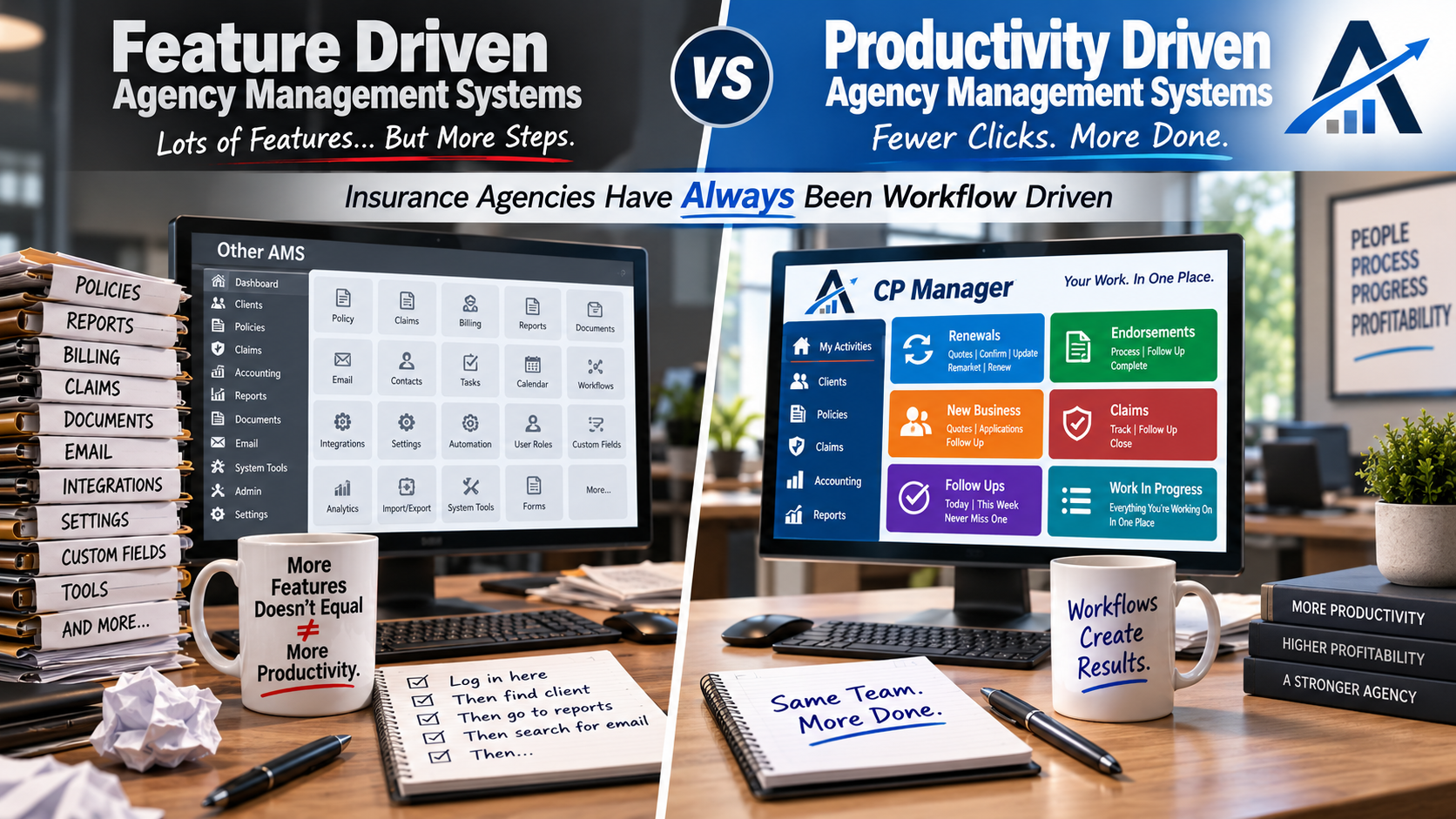
So we started with a blank canvas. Instead of copying existing systems (and their limitations), we re-engineered from the ground up with one guiding principle: create a system that would massively increase an agencies productivity and make it workflow-driven.

The result is CP Manager — a system designed around how agencies actually work, with productivity at its core. It’s the product of 25 years of real-world experience in agency operations, automation, and consulting.

Why This Matters

Most new vendors spend years just learning how agencies operate, and by the time they figure it out, their systems are already too rigid to change

With CP Manager, the opposite is true. It’s built on decades of hands-on experience with agencies, systems, and workflows — so from day one, it delivers real productivity gains.

Because at the end of the day, it’s not about flashy features.

It’s about how quickly your staff can service clients, process tasks, and keep the agency moving forward. In other words, it's to help CSRs process their day-to-day work in the least amount of time. That’s what drives profitability.

And that’s exactly why we built CP Manager.

How Will Client Management Software Help Me Manage My Clients?

Client Management Software

How Client Management Software Transforms the Way Insurance Agencies Serve Clients

Managing clients today goes far beyond keeping names and policies in a filing cabinet. Independent insurance agencies are expected to provide fast service, issue accurate certificates, track renewals, process claims, and still have time to build lasting client relationships. That’s where the right client management software comes in.

Unlike generic CRMs, specialized software for insurance agencies centralizes your client data, streamlines workflows, and gives your staff the tools they need to work smarter — not harder.

The result?

Less stress for your team and better service for your clients.

Why Client Management Software Matters for Agencies

1. Everything in One Place

With the right client management system, your CSRs can instantly see complete client profiles — policies, documents, notes, accounting, certificates, and more — without hunting through multiple programs.

This simplicity allows your staff to:

  • Answer client questions on the first call.

  • Reduce errors by eliminating double-entry.

  • Spend more time serving clients instead of fighting with clunky software.

2. Faster Service, Happier Clients

When your software is easy to use, CSRs and producers can process work quickly. Certificates, endorsements, renewals — all of it gets done faster. And when your staff is efficient, your clients feel it in the form of better, faster service.

3. Flexible Enough to Fit Your Agency

Every agency is unique. Whether you focus on personal lines, commercial lines, or a mix of both, your client management software should adapt to you — not the other way around.

That means:

  • Strong commercial and personal lines support.

  • Scalability for agencies of all sizes.

  • Pricing models that fit your financial goals.

4. Integration and Automation

Today’s agencies rely on multiple tools — rating systems, carrier portals, email, and more. Good client management software integrates with these systems and automates repetitive tasks.

This includes:

  • Downloading where carriers support it.

  • Streamlined handling of policies that don’t download.

  • Automated reminders, follow-ups, and renewal tracking.

The result is less wasted time and fewer things slipping through the cracks.

5. Proactive Client Service

Great service is about being proactive, not reactive. Client management software gives you the data and tools to:

  • Track X-dates and renewal opportunities.

  • Anticipate client needs before they call you.

  • Improve retention by demonstrating consistent value.

The Cost of Not Using the Right Client Management Software

Many agencies stay stuck with outdated or generic systems because switching feels like a hassle. But every day with the wrong software costs you money:

  • Lost productivity from extra clicks and inefficient workflows.

  • Missed cross-sell and renewal opportunities.

  • Frustrated staff and higher turnover.

The truth is, the pain of staying with the wrong system is far greater than the temporary effort of switching.

Why CP Manager Is the Client Management Software Built for Agencies

We designed CP Manager with one goal: to unlock your agency’s full potential. With 30 years of insurance automation expertise, we built a client management system that is:

  • Extremely easy to use

  • Single-entry across the board

  • A commercial lines powerhouse

  • Packed with workflow-driven tools that boost productivity

With CP Manager, your staff gets more done in less time — and your clients get the high-level service they deserve.

Ready to see how the right client management software transforms your agency? Schedule a Walk-Through Today

What Makes the Best Agency Management Systems?

What Makes the Best Agency Management Systems (And How CP Manager Stands Apart)

When it comes to evaluating the best agency management systems (AMS), the decision is bigger than software — it’s about the long-term success and profitability of your agency. The system you choose will determine how efficiently your staff works, how satisfied your clients are, and ultimately how profitable your agency becomes.

With so many vendors claiming to have the “best AMS,” it’s important to separate marketing hype from what actually drives productivity in an independent insurance agency.

What Is an Agency Management System?

An agency management system (AMS) is the backbone of modern insurance operations. It’s where you:

  • Manage client and policy data
  • Handle renewals, endorsements, claims, and other policy tasks; and send out certificates of insurance and auto IDs
  • Process accounting (agency bill + direct bill)
  • Handle producer commissions
  • Do marketing to build your agency like cross-selling and XDating
  • Coordinate staff workflows

In short, your AMS is where client service and agency profitability intersect.

But here’s the catch: not all systems are built the same.

What Defines the Best Agency Management System?

When evaluating the best AMS for your agency, there are several non-negotiables:

1. Ease of Use

The harder your system is to use, the more stressful the transition — and the more your staff will resist using it. A system must be intuitive, fast to learn, and easy to navigate so your CSRs and producers can focus on clients instead of fighting the software.

2. True Single-Entry

Double or triple entry is one of the biggest drains on productivity. The best AMS ensures single-entry workflows across personal and commercial lines, accounting, and client communications.

3. Commercial & Personal Lines Management

Most systems today are built for personal lines first. Commercial lines management is often an afterthought — but commercial lines can be quite complexity (and profitability). The best systems must handle both seamlessly, especially for agencies that want to grow their commercial lines books of business.

4. Workflow-Driven Design

Workflows are the backbone of every CSR. Renewals, endorsements, claims — each requires precise, repeatable steps. The best AMS should guide staff through workflows to ensure nothing slips through the cracks, while cutting down on wasted clicks and manual tasks.

5. Productivity and Profitability

Your staff is your largest expense. An AMS that lets your CSRs handle more accounts keeps producers focused on selling, and reduces the need to hire additional staff translates directly into higher profits.

Where Many AMS Vendors Fall Short

Most AMS vendors rush products to market in 1–2 years, focusing on adding “features” to check boxes. What gets overlooked?

  • Workflows (the backbone of the CSR)
  • Commercial lines efficiency
  • True single-entry
  • Flexibility for both download and manual processing
  • Ease of use in daily work

Once clients are added, the system’s table structures are locked, making it nearly impossible to redesign for real-world productivity. This is why most AMS systems feel clunky and inefficient.

Why CP Manager Is Different

At Agency AutomationTEAM (AAT), we spent 11 years developing CP Manager before releasing it. Why so long?

Because we refused to compromise on what makes the best agency management system:

  • Extremely easy to use — designed for CSRs and producers alike.
  • True single-entry across the board.
  • Commercial lines powerhouse (built first, not as an afterthought).
  • Workflow-driven design to simplify every task.
  • Integrated accounting built for insurance agencies.
  • Re-engineered notes, follow-ups, and attachments for modern communication.

The result?

A system that agencies say is a “re-engineering of the agency management system” — built not just to manage clients, but to massively increase agency productivity and profitability.

Is CP Manager the Best Agency Management System for You?

If you’re tired of clunky software, endless double-entry, and staff frustration, it’s time to see what a best-in-class AMS looks like.

Schedule a Walk-Through of CP Manager and discover why agencies are calling it the most productive system on the market today.

What are the Best Insurance Agency Management Systems?

Best Insurance Agency Management Systems

What are the Best Insurance Agency Management Systems?

Choosing the right and the best insurance agency management system (AMS) is one of the most important technology decisions your agency will make. The best systems don’t just store data — they help agencies work more efficiently, serve clients better, and scale without drowning in administrative work.

But with dozens of vendors on the market, how do you know which one is truly the best for your agency? Let’s break down what separates a good AMS from the best insurance agency management systems.

What Makes an Agency Management System “The Best”?

The best AMS platforms typically excel in five key areas:

1. Productivity & Workflow Support

  • Does the system reduce double entry?
  • Are tasks streamlined so staff can complete them in fewer clicks?
  • Does it support single-entry workflows for notes, policies, follow-ups, and accounting?

A system that looks good on paper but adds steps to daily tasks isn’t the best — it’s a burden.

2. Commercial & Personal Lines Strength

Many AMS vendors start with personal lines and only lightly support commercial lines. The best systems provide robust tools for both — especially for agencies with mixed books.

3. Flexibility for Agency "Business Models"

  • Can staff work efficiently from home or in the field?
  • Does it support multi-location or multi-agency groups?
  • Is it scalable for small agencies today but powerful enough for large ones tomorrow?

The best systems adapt to how you run your business — not the other way around.

4. Integrated Communication Tools

The best AMS platforms don’t just hold client information — they integrate email and correspondence into workflows so you can communicate quickly and track it all in one place. And they allow you access to these communication tools in or out of the office.

5. Accounting & Reporting

Insurance-specific accounting is often overlooked, but it’s critical. The best AMS platforms:

  • Handle direct bill and agency bill with ease
  • Provide reconciliation tools that save time
  • Generate reports that tie productivity to profitability
  • Reporting to help you work on your agency to increase your revenue and manage your agency

Key Questions to Ask When Comparing Systems

  • How does the system handle commercial lines?
  • Does it support single entry, or will my staff retype the same data multiple times?
  • What workflows are built in (renewals, endorsements, cancellations, claims)?
  • How strong is the reporting? Can I measure staff productivity and profitability?
  • How many windows and steps do you have to go through to stay on top of work in progress, outstanding policy tasks and process policy tasks?
  • Will it support my agency’s growth for the next 5–10 years?

Examples of Top Features in Today’s Best Insurance Agency Management Systems

While no single system is perfect for everyone, the best AMS options generally offer:

  • Single-entry workflows for speed and accuracy
  • Robust policy management for both PL and CL
  • Powerful search and “find” features to locate notes, attachments, or transactions instantly
  • Paperless functionality with e-signatures and digital document storage
  • Multi-agency capabilities for clusters and larger organizations
  • Integrated accounting designed specifically for insurance
  • Integrated correspondence to support workflows and give you access to it regardless to the device --PC, Laptop, Smartphone-- being used to access the system

Where CP Manager Stands Out

At Agency AutomationTEAM, we designed CP Manager around productivity, not just features. After decades of consulting with agencies on workflows, we knew the biggest problem with most AMS platforms was inefficiency.

That’s why CP Manager was built to:

  • Virtually eliminate double entry
  • Re-engineer core functions like Notes, Follow-Ups, integrated emailing and Attachments to save time
  • Support both small agencies and enterprise groups with 80+ users
  • Provide industry-specific accounting tools like Direct Bill Reconciliation with “Save & Finish Later”
  • Turned the cumbersome accounting found in most systems to push-button easy
  • Is a commercial lines powerhouse
  • Deliver powerful multi-agency management tools

Agencies using CP Manager consistently report dramatic time savings and call it “the most insurance-specific system they’ve ever used.”

Final Thoughts

The best insurance agency management systems aren’t just about having the most features — they’re about making your agency more efficient, profitable, and client-focused.

If you’re comparing options, focus on productivity, workflow support, and scalability. And when you’re ready to see what a truly productivity-driven AMS can do, take a closer look at CP Manager.

👉 Schedule a walk-through today to see why many call it the next evolution in agency management systems.

How Do Insurance Automation Systems Work?

How Do Insurance Automation Systems Work?

Running an insurance agency today means balancing hundreds of moving parts — client communication, policy servicing, renewals, downloads, commissions, accounting, compliance, and new business development. Without the right system in place, staff spend more time wrestling with paperwork and outdated tools than actually serving clients.

That’s where Insurance Automation Systems come in, also called "agency management systems".

Unlike generic CRM platforms, which are designed for any business, insurance automation systems are built specifically for insurance agencies. They combine client, policy, carrier, and accounting management into one single-entry platform that automates time-consuming workflows — so your team can focus on productivity and client relationships, not busywork.

Contact-Based vs. Policy-Based Insurance Automation Systems

Most insurance automation systems fall into one of two categories:

1. Contact-Based Systems

  • Organize everything around the client or contact.
  • All policies, carriers, commissions, and communications link back to that client record.
  • Makes it easy to see a full client profile across multiple carriers and lines of business.

2. Policy-Based Systems

  • Organize everything around individual policies.
  • Each policy becomes a separate record connected to the client, carrier, and agent.
  • Can create duplication and inefficiencies when clients hold multiple policies.

Modern agencies overwhelmingly prefer contact-based insurance automation systems because they give a 360° client view and reduce duplicate work.

Key Benefits of Insurance Automation Systems

The real value of insurance automation systems comes down to three things: specificity, totality, and productivity.

1. Specificity

These systems are designed specifically for the insurance industry — not retrofitted CRMs. That means workflows for endorsements, renewals, certificates, accounting, and downloads are built in from day one. Implementation is faster, adoption is easier, and your staff won’t have to “make do” with tools that were never meant for insurance.

2. Totality

Insurance automation systems bring everything into one platform:

  • Client & policy management
  • Carrier downloads (personal & commercial lines)
  • Commission tracking
  • Insurance-specific accounting
  • Certificates & forms
  • Automated communications & reminders
  • Reporting & performance insights

Instead of juggling multiple software programs, you gain one streamlined system designed for your entire agency.

3. Productivity

The ultimate goal is efficiency. The purpose of insurance automation systems is:

  • Eliminate double and triple entry with single-entry design.
  • Automate routine tasks like renewal reminders, birthday emails, and follow-ups.
  • Reduce training time with intuitive, easy-to-use workflows.
  • Give CSRs more time to serve clients and cross-sell.
  • Free up producers to spend less time fighting the system and more time selling.

Every extra click, every lost document, and every duplicate entry adds up. By automating these processes, you save hours every week — hours that go directly back into client service and revenue growth.

Why It Matters for Your Agency

At the end of the day, the question isn’t whether you can afford an insurance automation system — it’s whether you can afford not to have one.

  • Agencies without automation end up overstaffed just to keep up with the workload.
  • CSRs get burned out re-entering data and chasing paper trails.
  • Producers avoid entering data correctly, which piles more work onto CSRs.
  • Hiring and training becomes a constant battle because inefficiency is built into the system.

On the other hand, agencies with the right automation system see productivity soar, profits rise, and client satisfaction increase — all while reducing stress across the team.

Final Thoughts

So, how do insurance automation systems work? They work by taking everything that slows your staff down — duplicate entry, disjointed tools, manual follow-ups — and automating it in a system built specifically for agencies.

The result: a more productive staff, happier clients, and a more profitable agency.

If you’re ready to see what the right automation system could do for your agency, explore CP Manager — designed by insurance automation consultants with over 30 years of experience helping agencies increase productivity and profits.

Schedule a Walk-Through Today

Is a Management System Right for My Company?

Management System

This is an article for agencies who do not have an agency management system...

Is a Management System Right for Your Agency?

If you’re still running your insurance agency on spreadsheets, file folders, or a basic CRM, you might be wondering: Do I really need a full agency management system (AMS)?

It’s a fair question — adopting new technology requires time, money, and training. But the truth is, not having the right system in place is often far more expensive in lost productivity, missed opportunities, and frustrated staff.

Signs Your Agency May Be Outgrowing Spreadsheets or Basic Tools

  • You spend too much time searching for client information instead of serving clients.
  • Policy renewals and other policy tasks and follow-ups sometimes slip through the cracks.
  • Your staff spends hours on duplicate data entry.
  • Producers and CSRs can’t access what they need when working remotely.
  • Commercial lines clients feel underserved because your system isn’t built to handle their complexity causing big delays in properly servicing them.

If two or more of these sound familiar, your agency is ready for a management system.

Why a Management System Is Essential

A true AMS is not just a database — it becomes the backbone of your agency. It centralizes your client, policy, and accounting information, integrates workflows, and supports the way you actually process business.

With the right system, you’ll:

  • Save time through single-entry workflows and automation.
  • Improve client service with faster response times and better communication tracking.
  • Support growth by handling both personal and commercial lines efficiently.
  • Work from anywhere — whether you’re in the office, at home, or meeting a client.
  • Gain insights into your business through real-time reporting and accounting.

Overcoming Common Misconceptions

Some agencies hesitate because they believe:

  • “We’re too small for a management system.” In reality, the earlier you implement one, the faster you can grow without chaos.
    • Plus, a good system will allow you to go far longer before needing to hire a CSR which means you'll have good cash flow when it's time to hire your first CSR.
    • This also means each CSR will be able to manage a far larger book of business which, again, means you'll be able to go longer before needing to hire your next CSR.
  • “It will take too long to train staff.” This has been a legitimate concern when considering some of the other systems on the market. CP Manager was designed to be intuitive, with user-friendly navigation and fast onboarding.
  • “We can’t afford it.” The truth: lost productivity and missed renewals usually cost far more than the system itself.

So… Is a Management System Right for Your Agency?

If your goal is to grow, retain clients, and run efficiently, the answer is yes. A management system isn’t just software — it’s the foundation for building a more productive, profitable agency.

And when you’re ready to take that step, CP Manager is here to help. It was designed from the ground up by an insurance automation consultant with 30+ years of experience — not just to check off features, but to truly increase agency productivity.

👉 Schedule a walk-through today and see how the right management system can transform your agency.

Agency Marketing – Is YouTube Right for Your Insurance Agency?

Agency Marketing

Agency Marketing: Is YouTube Right for Your Insurance Agency?

YouTube isn’t just for big brands or influencers — it can be a smart, cost-effective way for insurance agencies to attract and educate prospects. But here’s the big question: should your agency invest the time into YouTube? Is this a good agency marketing strategy?

The answer depends on whether you’re ready to create content that connects with prospects and have the right processes in place to follow up on the leads it generates.

Why Insurance Agencies Should Consider YouTube

  • Educate & Build Trust – Short videos answering common questions (“What’s the difference between general liability and professional liability?”) position your agency as the expert.
  • Humanize Your Agency – Prospects want to do business with people, not just a name. Video helps them see and hear your team, creating familiarity before they ever call.
  • Boost Visibility – YouTube is the second-largest search engine. A well-optimized video can put your agency in front of local prospects searching for insurance answers.
  • Repurpose Content – One video can be clipped for LinkedIn, posted to Facebook, or embedded in an email campaign — giving you more mileage from every piece of content.

The Real Key to Success: Content Strategy & Consistency

The agencies that win on YouTube aren’t necessarily the ones with the best equipment or biggest marketing budgets. They’re the ones who:

  • Pick a niche or set of topics that matter to their audience.
  • Consistently post helpful, authentic content.
  • Stay focused on educating, not just selling.

If you can commit to showing up with valuable content regularly, YouTube can become a steady source of inbound interest.

Where CP Manager Fits In To Support Agency Marketing

While content is the key, systems like CP Manager help you make the most of your YouTube success and agency marketing by:

  • Capturing lead source data – Track not just that a lead came from YouTube, but the specific video they watched.
    • This allows you to see which medias are the most effective (YouTube, Facebook, Direct Mail, etc.) and within the media which ad, video or marketing piece is the most effective.
  • Streamlining follow-ups – Enter notes and follow ups as needed.
  • Recall Date & Time – CP Manager has "contact management" features like creating a recall date and time of when to follow up with leads, prospects and clients. Follow up phone calls in CP Manager are so much more efficient. For producers, it helps them sell more insurance!
  • X-Dating policies – After talking to a lead, getting the x-date of their policies and then working them like renewals.
  • Measuring ROI – Easily run reports to see how many clients and policies originated from YouTube efforts.
  • Cross-Selling Opportunities – Once a YouTube lead enters your book, CP Manager helps you uncover other policies they may need.
    • You can also run cross-selling reports to see who has a specific coverage but not another coverage.

So, Is YouTube Right for You?

If your agency is committed to creating consistent, helpful video content, then YouTube can absolutely be worth it. And while video content attracts leads, CP Manager ensures those leads are captured, tracked, and worked effectively — turning YouTube (and all of your other agency marketing strategies) into a true growth engine for your agency.

Next Step: Ready to see how CP Manager supports your marketing efforts — YouTube and beyond?

Schedule a walk-through today

What is an Agency Management System?

What is an Agency Management System?

For independent insurance agencies, an agency management system (AMS) is more than just software — it’s the backbone of daily operations. At its core, an AMS helps agencies manage clients, policies, carriers, handle insurance specific accounting, and service tasks in one place, giving staff the tools they need to work faster, smarter, and more profitably.

Unlike generic CRM systems or spreadsheets, an AMS is built specifically for the insurance industry. It reflects the real workflows that CSRs and producers handle every day (or at least is suppose to): quoting, policy issuance, endorsements, renewals, certificates, billing, and client communications.

“In short, it’s the system that’s supposed to keep your agency running smoothly and productively — helping you quickly and efficiently service your clients and their policies.

Agency Management System vs. CRM

A CRM helps track relationships and interactions — but it’s not designed for insurance. With a CRM, you won’t find built-in tools to process renewals, manage commissions, track carrier downloads, or create ACORD forms.

An agency management system, on the other hand, is purpose-built for insurance. It combines the relationship-tracking benefits of a CRM with the insurance-specific workflows you need to actually service policies and clients. It eliminates double-entry, connects client and policy data, and ensures every step in the service process is faster and easier.

Key Capabilities of an Agency Management System

The best AMS platforms do much more than store client data. They help you:

  • Access anywhere: Cloud-based systems allow staff to work from home, the office, or on the road.
  • Manage policies and clients seamlessly: Add clients, policies, vehicles, drivers, locations, and instantly link them together.
  • Streamline service tasks: Process endorsements, renewals, cancellations, and certificates in fewer steps.
  • Generate ACORD forms and correspondence: With single-entry, data flows directly to forms, letters, and emails.
  • Stay on top of work in progress: Dashboards like CP Manager’s My Activities keep CSRs from missing critical tasks.
  • Handle insurance-specific accounting: Direct bill commissions, agency bill invoicing, trust bank account management, return premiums, and more.
  • Measure productivity: Reporting and analytics help you spot time wasters and growth opportunities.

How to Choose the Right AMS

When evaluating systems, focus less on flashy features and more on how the system will impact your agency’s productivity. Key questions to ask:

  • How does the system reduce double-entry?
  • Can my staff complete core tasks (endorsements, renewals, certificates) in fewer steps?
  • Is the system intuitive enough that staff will adopt it quickly?
  • What training and support are provided to ensure success?
  • How does the vendor approach security, data migration, and integrations?

Remember: the right AMS should adapt to your agency’s workflows, not force you to adapt to clunky software.

Why It Matters

The right agency management system directly affects your bottom line. Increased productivity means your staff can handle more clients without adding headcount, reduce errors, and create a better client experience. Agencies that invest in the right system often find they free up hours of staff time each month — time that can be spent on revenue-producing activities.

Next Steps

To truly understand an AMS, don’t just read about features — see it in action. Request a walk-through of CP Manager or test drive it yourself. When you experience how much easier client and policy management can be, you’ll understand why agencies say the right AMS isn’t just software — it’s a productivity engine for your entire business.