
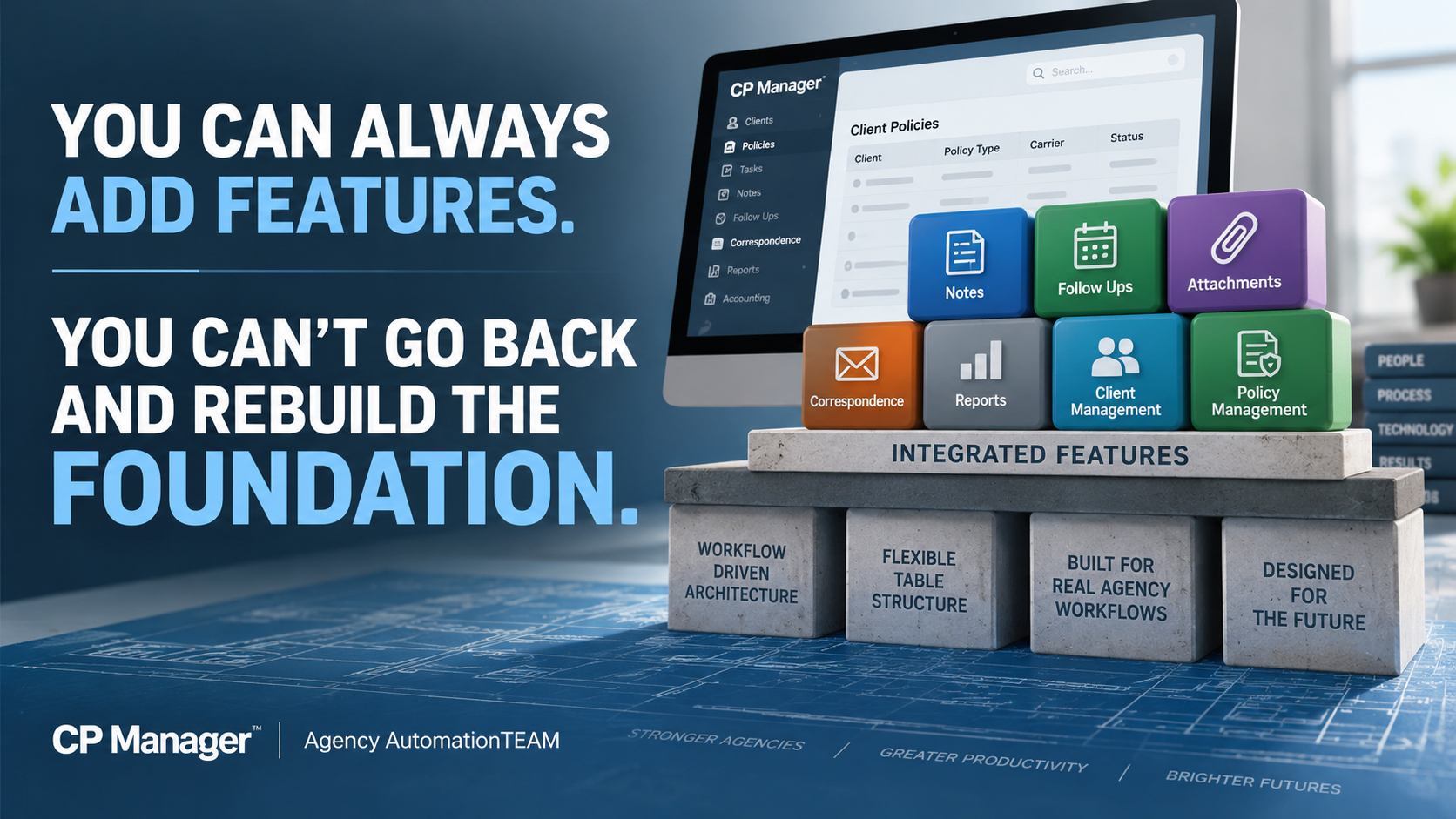
You Can Always Add Features. You Can't Go Back And Rebuild The Foundation.
This is why CP Manager was built around agency workflows first—which makes it possible for features to be FULLY integrated into the system.
By Bradley Chesnut, Founder
Agency management systems have become increasingly feature-rich over the years. New features continue to be added, feature lists get longer, and those features often become one of the primary ways systems are compared. It's also how vendor sales reps sell their systems.
The number of features in an agency management system tells you very little about how efficiently your staff can actually use them. What matters far more is how those features work together to help your staff process their work more efficiently.
Adding features to a software program is relatively easy. Building the foundation that allows those features to become part of an efficient workflow and fully integrated into the system isn't so easy.
And there's an even bigger problem. If you build the features first and later decide you want to create a truly workflow-driven system, you have likely already built the very foundation that prevents you from doing it.
That's why, when we designed CP Manager, we made a very deliberate decision: We chose to get the foundation right first, because everything we built afterward would depend on it.
That foundation is the all-important table structures to support a workflow-driven system.
Features Are What You See. The Foundation Determines How They Work.
Most agency management systems have many of the same core features: Policies. Notes. Follow Ups. Attachments. Correspondence. Reports. Accounting.
Put two systems next to each other on a feature-comparison chart and you can put checkmarks beside many of the same things. But that doesn't tell you how much work it takes to actually use those features.
That's where the difference between a feature-driven system and a workflow-driven system becomes important.
A feature-driven approach starts by asking: What features does the system need?
The client database gets built. Policies are added. Notes are added. Attachments are added. Correspondence is added. More and more features get added over the years.
Eventually you have a very long feature list.
At this point the underlying table structures and foundation of the system are locked in. When workflows are addressed later, those workflows have to work around a foundation that wasn't originally designed to support them.
This was one of the biggest lessons I learned during my years working with agency management systems since 1991. I'd identify something that could eliminate unnecessary work or make a process considerably more efficient and shared the information with the vendor.
Too often, the answer came back to some version of:
“We can't do that because our table structures don't support it.”
Once agencies start using a system and thousands of client and policy records are sitting inside it, changing those underlying structures becomes enormously difficult, even impractical.
You can't casually rip apart the foundation underneath a live agency management system because you've now decided you'd like the workflows to operate differently.
That experience had a tremendous influence on how CP Manager was designed. We approached it from the opposite direction.
Before creating the underlying structures, we looked at how the work actually gets processed inside an insurance agency.
What happens when a CSR processes an endorsement?
What happens during a renewal?
What information will they need?
Where will they need to go?
What other functions might they need while completing that work?
What are the possible windows a CSR would need for a policy task?
What unnecessary steps can we eliminate?
How can we simplify the process with fewer windows, fewer steps, less jumping around the system, and better data flow to eliminate duplicate entry?
Then we designed the system and its underlying structures to support those workflows.
A workflow-driven system asks what features are needed to support policy workflows first, then what additional features are needed to better manage clients and their policies.
The features had to fit the workflow—not the workflow fitting around the features.
Having A Feature And Integrating A Feature Into The System Are Two Very Different Things
Here's where this becomes much easier to understand.
CP Manager has Notes, Follow Ups, Attachments and Correspondence. There's nothing particularly remarkable about saying that.
Other agency management systems have Notes, Follow Ups, Attachments and Correspondence too.
On a feature-comparison chart, everybody gets four checkmarks. But the checkmarks don't tell you how those features have been integrated into the system.
All four of these features in CP Manager were designed to be available throughout the system and integrated into the workflows where they're actually needed.
That's an entirely different objective than simply saying: “Yes, we have that feature.”
To show you what we mean by integrated, let's look at just one of them and how it's integrated throughout the system.
This is what we mean when we talk about integrating a feature into a workflow. The objective isn't simply to make the feature available. It's to understand when it's needed, where it's needed, what CP Manager already knows when you use it, what other parts of the system it should interact with, and how many unnecessary steps we can eliminate in the process.
Notes, Follow Ups, Attachments and Correspondence demonstrate the development philosophy behind CP Manager: don't simply add a new feature—integrate it into the system and into the workflow.
And because of the foundational design of CP Manager, “integrated into the system” means something very different than simply adding another feature to a menu.
With The Workflow-Driven Foundation Now In Place, Our Attention Has Turned To Adding Key Features
The decision we made years ago about how CP Manager should be built now gives us an important advantage.
Every new feature can be designed from the beginning to work within the workflows and integrate with the rest of CP Manager.
As we design a new feature, we ask:
Where does this belong within the agency's workflow?
What information does CP Manager already know that shouldn't have to be entered again?
What other parts of CP Manager should this feature interact with?
What steps can it eliminate?
The objective isn't simply to add the feature. It's to make the feature part of the workflow and fully integrated into the system.
Our Next Major Feature Shows Exactly What This Foundation Makes Possible
Introducing CP Manager's Exclusive Workflow Task Manager (WFTM)
One of the most difficult and time-consuming parts of training a new CSR—or even an experienced CSR joining your agency—isn't teaching them where the buttons are.
It's teaching them how to process the work.
The correct workflow for processing a policy task is determined by three things:
- Line of Business.
- Carrier.
- Policy Task.
Change any one of those and the steps may change. That means a CSR ultimately needs to learn and remember many different policy-task workflows.
The Workflow Task Manager is being designed to put that knowledge directly into CP Manager.
For years, one of our founder's specialties as an insurance automation consultant was creating detailed workflow manuals so CSRs would know exactly how different policy tasks should be processed.
With the Workflow Task Manager, we've taken what used to require a workflow manual and put it directly into the management system.
When a CSR starts a Workflow Task from a policy, CP Manager already knows the Line of Business and Carrier for that policy. The CSR simply selects the Policy Task to run.
That's it.
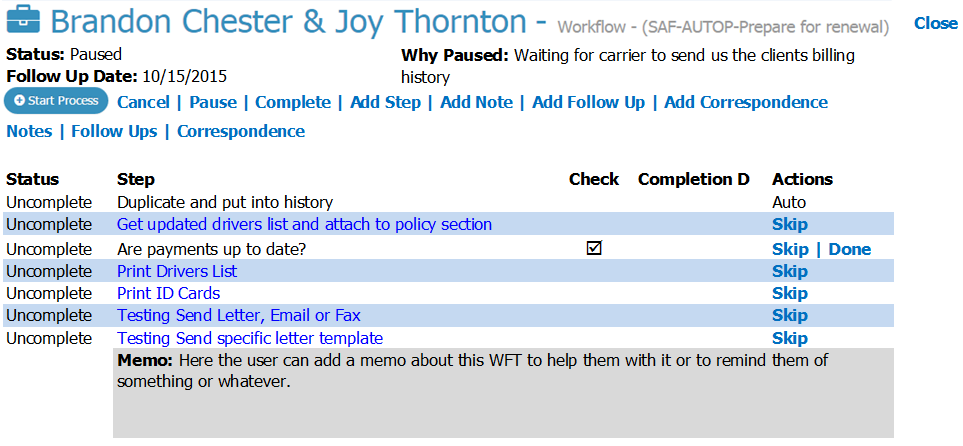
CP Manager presents the appropriate workflow and walks the CSR through the steps required to process that specific task. All the CSR has to do now is just click on the hyperlinks to open up the window for the next step in the workflow.
Instead of spending months learning and memorizing different workflows, a CSR will know how to process a policy task in seconds.
They don't have to remember the workflow. CP Manager remembers it for them.
We Couldn't Have Built It This Way If We Hadn't Built The Foundation First
The Workflow Task Manager was part of the plan from day one. But it couldn't be added until the table structures were there to support it and the other pieces were put in place.
It needed policy, carrier and Line-of-Business information. It needed Notes, Follow Ups and Correspondence. There are over 90 steps to choose from. And most importantly, it needed the workflow-driven foundation we've built.
That's what allows the Workflow Task Manager to do far more than simply display a checklist.
The CSR can work through each step and go directly where needed in CP Manager. Notes, Follow Ups, attachments, correspondence, and other parts of CP Manager become part of the workflow.
A workflow task can be paused when waiting on a client or carrier, with the reason documented and a Follow Up established so the work isn't forgotten.
We're not building another task checklist and bolting it onto CP Manager. We're bringing the capabilities already built into CP Manager together around the actual work the CSR is processing.
That's the difference between simply adding another feature and integrating a feature into a workflow-driven system.
There's Another Important Reason To Consider CP Manager Now
The WFTM will be an optional, per-user add-on to CP Manager and will be the most expensive add-on we offer. There's a reason for that.
We've invested more programming time into the Workflow Task Manager than any other individual feature we've developed. But more importantly, we know it will have a greater impact on agency productivity than any other feature we could add.
From September 1, 2026 through January 31, 2027, agencies that purchase CP Manager will receive the Workflow Task Manager FREE for every CP Manager user they purchase.
Purchase CP Manager for five users during this period, and you'll receive WFTM for all five users at no additional cost once it's released.
And that's a benefit you'll continue receiving long after this introductory offer ends.
When We Look At Features, Seriously, What Features Actually Matter To An Agency?
There's another lesson I've learned after more than three decades in insurance automation.
For as long as systems such as Applied and AMS360—originally Pathfinder and known by different names over the years—have been around, I've consistently heard agency owners and CSRs tell me essentially the same thing: “We only use about 15–20% of the system.”
Or: “We don't use but a fraction of the features, but we're still paying for all of them because they're bundled into the system.”
What they're ultimately telling me they really want from their agency management system is much simpler: “We just want to service our clients and their policies. That's really what we need.”
I get it, and I agree! That's why we'll eventually have 2 systems...
- CP Manager to handle your client and policy management in a highly efficient and productive way, and
- The TIME System, a full-blown and true agency management system, for larger agencies who have greater needs.
This is not the time or place to discuss the TIME system. For now let me just say that it's also been planned since day one, and as part of that planning, when CP Manager users upgrade to it there will be no data conversions (100% of their data will be there), no downtime, and no new learning curve creating another breakthrough in the insurance automation industry.
This is the advantage of planning these things from the beginning. CP Manager had to be first, and the foundation had to be right because...
The fundamental reason agencies use an agency management system hasn't changed:
It's to manage your clients and their policies. Client & policy management is the foundation to these systems!
The question is, "how efficient do you want your staff to be, and how many policies do you want each CSR to be able to manage?"
That's why our development priorities for CP Manager are centered around better client management, better policy management, and increasing agency productivity.
It is NOT our objective to compete with other systems over who has the most features.
Our focus is on helping your agency become as productive and profitable as possible.
That's where the focus needs to be—and that's what will drive the features we add to CP Manager.
Features absolutely matter. But features should have a purpose:
- Help your staff manage clients and policies better,
- Eliminate unnecessary work,
- Make the agency more productive, and
- Increase the profits of an agency.
So What Does All Of This Mean For Your Agency?
At the end of the day, your agency doesn't buy a management system because of its table structures, programming architecture, or even the number of features it has.
You buy it to help your staff manage your clients and policies—and get the work done as efficiently as possible.
That's why the foundation matters.
When the system is designed around how the work actually gets processed:
- Features can work together instead of functioning as separate pieces.
- Information the system already knows can follow the work.
- Unnecessary steps can be eliminated.
- Your CSRs can spend less time navigating the system, re-entering information and keeping track of what needs to happen next.
And those differences get repeated hundreds of times, across every CSR, every week.
That's where the impact becomes much bigger than simply saving a few minutes on a policy task.
It means your existing staff can handle more business.
It means you can delay the need to add another CSR.
It means new employees can become productive faster.
And ultimately, it means greater profitability for your agency.
That's what the workflow-driven foundation of CP Manager was built to accomplish.
Have Questions About What You've Just Read?
The way a management system is built affects much more than which features it offers. It can affect how those features work together and how efficiently your staff can actually use them.
If you'd like to discuss any of this with us, let's talk...
See The Difference For Yourself
This is difficult to fully appreciate from a feature list—or even from an article.
You need to see the workflows.
During a CP Manager Walk-Through, we'll show you how these features have been integrated throughout the system and how CP Manager was designed around the work your staff actually performs every day.
Don't just ask us what CP Manager has. See how CP Manager works.